WordPress Security in the Age of AI: Why Old Bugs Matter Now
AI is finding old software bugs faster, for defenders and attackers alike. Here is what that means for business websites, and the eight things owners should do now.
A business owner opens the same website every morning. The booking form works. The shop takes orders. Nothing looks different. However, WordPress security can change while the page stays exactly the same, because the cost of finding and using an old software flaw is falling.
In fact, the code does not have to change for the risk to change. For example, a bug that once took weeks of specialist work may become practical to study once an AI system can read code, suggest test cases, run tools and learn from failed attempts. Those abilities help a maintainer repair a weakness. In the same way, they can help an attacker understand how to use it.
This matters for businesses on WordPress because a website is really a collection of separately maintained software: WordPress itself, plugins, a theme, PHP, a database, the hosting setup and admin accounts. As a result, keeping the visible site working is only one part of keeping that collection secure.
W3Techs measured WordPress on 39.6% of all websites in its survey on October 24, 2026, and on 58.3% of websites whose content management system it could identify.1 Those figures show reach. However, they do not show how many installations are vulnerable, how many belong to small businesses, or how many have been hacked.
So the practical point for an owner is simple. Because security research is getting faster, the ability to find, update and recover the software behind the business becomes more valuable.
An old bug can become a new emergency
Software age and vulnerability age are different things. For example, an old application can be well maintained. Meanwhile, a recently updated one can still carry a defect introduced years ago. Years of service without an incident show that a program is useful. However, they do not prove that every unusual input has been tested.
There are, in fact, several kinds of “old bug,” and each creates a different job:
- Unknown and unpatched. A flaw has existed for years and nobody has found it yet.
- Suspected but unproven. A weakness is known, but there is no demonstrated exploit or agreed fix.
- Fixed but not installed. A fix was published long ago, while neglected websites still run the old code.
AI can affect all three. Updating, however, only helps once a fix exists and is actually deployed.
Two terms help here. First, a zero-day is a flaw with no fix available when it becomes known or exploited. Second, an n-day is a disclosed flaw that attackers can study, often after a patch exists. For many owners, the real danger is the second kind: a known, fixable weakness still sitting on their site.
As a result, the question is not only whether AI can find something new. Rather, it is also whether AI makes an already disclosed problem easier to understand, reproduce or adapt.
What AI adds to security research
Security teams have used automation for decades. Vulnerability scanners, static analysis, fuzzing and automated tests all came before today’s language models. Fuzzing, for instance, feeds software huge numbers of generated or altered inputs to expose failures. In addition, AI builds on that history by adding a new way to propose explanations and decide what to test next.
In a good research setup, a model can read a function, follow its callers, suggest an unusual sequence of events, write a test and check the result. Specifically, a crash report then becomes feedback for the next attempt. Therefore the useful unit is the whole loop: a guess, an experiment, the evidence, and a better guess.

Google’s Big Sleep project gave an early public example in November 2024. Its AI-assisted system found a previously unknown memory-safety flaw in SQLite while studying variants of earlier issues.2 Importantly, developers fixed it the same day it was reported, before the flaw reached an official release. In other words, this was exposure prevented before deployment. Google also called the work research and explained that an earlier fix gave it a focused starting point.
That starting point matters. Because of that, a tool does not need to understand every possible problem in a codebase to be useful. Instead, it can chase a narrow question. If this permission check was missing here, is the same mistake in a related handler? If this cleanup step fails, what happens to the next request?
The same kind of analysis supports repair. For instance, it can help explain a root cause, suggest a patch, find similar code and propose tests. Whether those outputs are correct, though, still has to be proven. Table 1 sets out where AI helps at each stage and what proof is still needed.
The evidence now includes bugs that survived for decades
In March 2026, Mozilla reported 22 security CVEs from its work with Anthropic, including 14 high-severity bugs.3 Notably, useful findings came out of Firefox, a mature project that already invests heavily in security.
Anthropic’s April research report described a 27-year-old OpenBSD vulnerability and a 16-year-old FFmpeg vulnerability found with Mythos Preview.4 Their impact differed. For example, the OpenBSD bug could crash a reachable host. By contrast, the FFmpeg bug involved an out-of-bounds write that the researchers judged hard to turn into a practical exploit. Therefore neither should be described as a proven way to take over any server.
Mozilla later published its own account of AI-assisted hardening, including a 15-year-old browser bug and a 20-year-old XSLT bug.11 That adds evidence from a software maintainer, not only from a model developer.
These are examples of flaws surviving established review and testing. However, they do not prove that every old program is unsafe, or that every model can repeat the results. Still, they show why “someone would have found it by now” is weaker comfort than it used to be.
PHP2Shell brings the story directly to WordPress
The October 2026 PHP disclosures connect AI-assisted research to the software underneath WordPress. Wiz reported using AI for discovery, exploit development and patch validation on flaws in PHP code that had been there for more than a decade.5 In particular, the team showed remote code execution against WordPress, Drupal and Joomla deployments in controlled tests. Those tests prove specific working attack paths. They are not, however, a count of exposed websites.
The PHP Foundation’s account adds an important qualification.6 Developers had seen signs of the underlying out-of-memory problem in 2024, but no concrete exploit path was established then. Furthermore, fixes involved hard tradeoffs around compatibility and operations. Then reports from Calif, OpenAI and Wiz in 2026 made the impact clear and moved the fix to the top of the list. Notably, the Foundation also acknowledged failures in decision-making and resourcing.
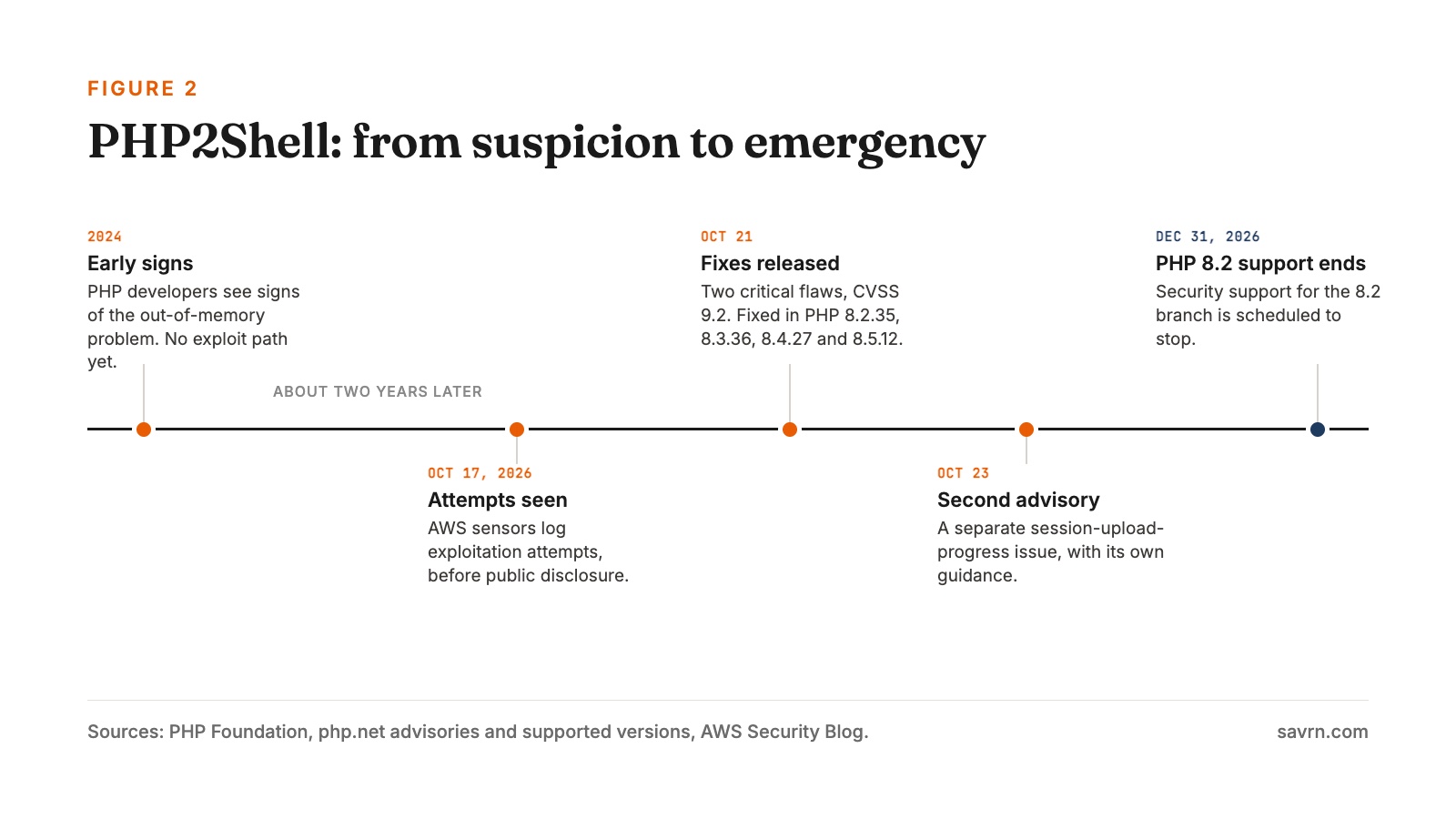
That makes the case more useful than a simple story about a machine finding what humans missed. In practice, a suspected weakness, a reliable demonstration of impact and a production-ready fix are three separate achievements. AI-assisted work can change what is practical at each stage, while the organization still has to decide, coordinate and ship.
Calif’s researcher also stressed the value of prior knowledge about PHP and its vulnerability history.14 As a result, that account warns against assuming a simple prompt can find every bug. In particular, the human part includes picking a promising question and seeing why an odd result matters.
PHP’s official October 21 advisory names CVE-2026-109618 and CVE-2026-109619, and PHP rated both CVSS v4.0 9.2.7 Importantly, it says all web-serving PHP installations need attention, with the highest demonstrated risk in Apache mod_php. The first fixed releases on supported branches were 8.2.35, 8.3.36, 8.4.27 and 8.5.12. In addition, Linux distribution vendors may also ship verified backports.
WordPress is the application, while PHP is the engine that runs it. Therefore updating the application does not update the engine. Consequently, a dashboard showing no pending WordPress updates is not proof that the server has the PHP fix.
On October 23, PHP also published a separate informational advisory about session upload progress, CVE-2026-115560, with the full advisory due alongside the next release.7 It involves an unusual setup that changes how sessions are serialized at runtime. PHP recommended turning off session upload progress until a regular bugfix release, while noting that sites without that runtime change can leave it on. However, that setting does not replace the updates for the two critical flaws. This guidance was current on October 24, 2026, so check the advisory again before acting.
Finally, Datadog’s analysis separates request handling, deployment configuration and attack requirements.15 Importantly, it also says neither constraint prevents exploitation, and that PHP’s default memory limits are vulnerable. So no owner should assume their setup is safe. Instead, ask your provider to confirm the fix on the real serving environment.
The public patch starts another clock
A security update helps defenders by closing a weakness. However, it can also show where the weakness was. For example, researchers and attackers can compare the changed code with the old version and work out why the change was needed. That process existed before AI. Now, though, models can help with the reading and testing involved.

AWS reported a first PHP2Shell exploitation attempt against its MadPot sensors on October 17, 2026, with more on October 21, all before public disclosure.8 AWS said plainly that it was unclear whether those attempts would have worked against real systems. So sensor activity should not be reported as a count of breached businesses.
AWS also described AI-assisted analysis as lowering the cost of turning a patch or advisory into a working exploit.8 Even so, its broader point supports a practical response: prepare emergency updates before technical details spread. It does not, however, prove that AI produced any particular malicious request.
For businesses, this creates two overlapping races. First, maintainers need to find and fix weaknesses before attackers use them. Second, owners and providers need to deploy those fixes before the remaining exposure becomes useful to an attacker. Consequently, faster discovery only pays off when the rest of the process keeps up.
Why WordPress makes the economics especially important
WordPress combines wide adoption with a spread-out software ecosystem. A site may share its booking plugin with thousands of unrelated businesses, while its theme, payment integration and hosting come from different suppliers. As a result, one reusable attack on a shared component can be worth something across many targets.
An attacker may have no interest in the owner personally. Instead, a reachable website can offer traffic, search visibility, a trusted domain, computing power or access to customer interactions. The value comes partly from repetition: a small return per site adds up when the same method works again and again.
Patchstack recorded 11,334 new WordPress ecosystem vulnerabilities in 2025.9 Specifically, its report put about 91% in plugins and 9% in themes, with six low-priority core issues; the percentages are rounded. However, these are reported vulnerabilities in its dataset, not hacked sites or the share of installations affected.
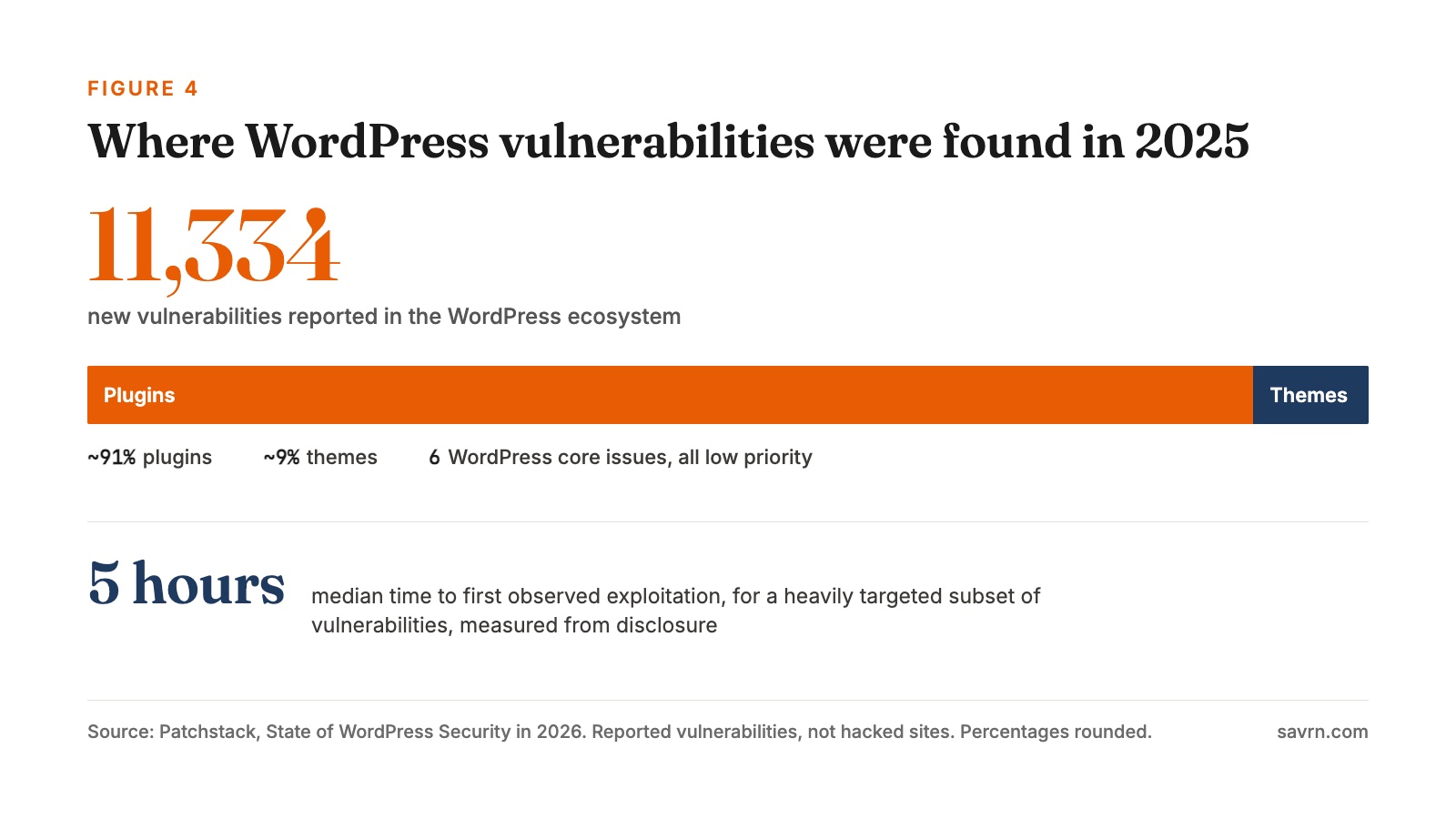
The same report gives an activity-weighted median of five hours to first observed exploitation for a heavily targeted subset.9 The clock starts when a protection rule was deployed at disclosure. Importantly, it does not mean every WordPress vulnerability leads to a hack within five hours. Nor does the report say AI caused that timing.
Even with those limits, the lesson for operations is large. For instance, a monthly calendar reminder cannot be the whole response plan for a serious internet-facing flaw. Someone needs to receive the advisory, recognize that an installed component is affected and act fast when the issue is an emergency.
Open source, meanwhile, gives defenders the code they need to investigate. Businesses benefit when researchers and maintainers can examine shared components and publish fixes. However, the hard part is paying for that work and delivering its results across a large installed base that is maintained unevenly.
A plugin can be current and still be the wrong dependency
“Everything is updated” is useful, but it leaves questions open. Does the vendor still support the product? Is the latest release affected by a newly disclosed issue? Has a paid license expired, which would stop updates? Is a bundled library maintained? Finally, is the feature worth its ongoing access to the website?
A plugin is running software, often with access to user data, stored content and sensitive workflows. Therefore its security cannot be judged only by whether it is free or paid, popular or obscure. Instead, the questions that matter are maintenance, permissions, how the vendor responds to reports and whether it can be replaced.
Abandoned software is a different problem from an overdue update. Since abandoned software has no supported fixed release, clicking “update” cannot help. In that case a business may need to remove the feature, move to a maintained alternative, limit exposure or use a temporary protective control while it replaces the plugin.
AI can help a developer understand unfamiliar legacy code or plan a migration. However, that help does not create a support commitment from a supplier who has disappeared. Therefore owners still need a real path away from software nobody is responsible for maintaining.
Many plugin bugs are failures of permission and trust
The PHP flaws involve memory safety inside the engine. WordPress extensions, by contrast, can fail at a different level: deciding who may do something, and how supplied data is handled. A site can run a fully patched engine while a plugin makes the wrong permission decision.
Take a hypothetical plugin that lets staff export customer records. The export handler checks a WordPress nonce, a token that helps protect requests against certain kinds of misuse. However, it never checks separately whether the account asking has permission to export those records. WordPress warns that nonces should never be relied on for authentication, authorization or access control.16 A developer needs a proper capability check and, where it matters, a check of access to the specific record.
An AI-assisted reviewer could help trace that handler and ask whether the token check is being mistaken for a permission check. Nevertheless, the finding would still need to be reproduced with the real user roles and request path in an isolated test environment. Specifically, the issue is the broken security decision, which can sit there for years while the feature works fine for authorized staff.
A second hypothetical involves text a customer submits that later shows up on an admin screen. However, storing the text safely does not make it safe everywhere it is displayed. WordPress documents escaping for each context: HTML, attributes, URLs and more.17 So a reviewer can follow the data to where it is shown and check that the right protection is applied.
Input validation is a separate job: checking that supplied data meets the expected rules before the application acts on it. WordPress recommends checking untrusted input early and treats validation and sanitization as different steps.18 These decisions still matter even when the code was first written by AI.
These examples show why the new tools matter beyond dramatic server exploits. AI can help investigate the ordinary logic that links a request, a permission decision, stored data and an output. A maintainer can then fix the shared pattern across related handlers, rather than treating each report as a one-off. To be clear, this is a proposed use of the tools, not a claim that either hypothetical plugin has been tested.
AI can help fix bugs, but repair is more than generated code
A useful security fix has to address the cause of the weakness and keep legitimate features working. For example, a patch that stops a crash by turning off checkout has not done the job. Likewise, a patch that passes an ordinary happy-path test can still leave the original flaw reachable.
Anthropic’s March account of the Firefox work describes separate checks: one for whether a bug can still be triggered and one for whether normal features still work.10 In addition, it reports that its exploit-writing experiment succeeded in only two cases, in a test environment with important defenses removed. Those results describe that model and that experiment at that time, rather than a permanent limit on AI.
For a developer maintaining a WordPress plugin, a sound workflow is to reproduce the issue in an isolated environment, confirm the security boundary involved, review a root-cause fix and test both the failure case and normal use. After that, the fix has to reach the production copies that actually serve visitors.
For a business owner, the matching question is simpler: what evidence shows the problem is closed? A good answer includes the relevant advisory, a fixed package or vendor backport, proof of deployment and checks of the business functions that matter. By contrast, an AI-written explanation alone cannot provide that evidence.
There is also a capacity problem. The PHP Foundation reported handling more than 100 reports since July that were invalid, duplicates or could not be reproduced, alongside its confirmed security work.6 It said AI helps with validation and grouping, while people make the decisions and write the patches. In short, discovery can get cheaper while maintainers still face a heavy review and release load.
The damage can hide behind a normal-looking homepage
Picture a hypothetical appointment-based business. The owner sees the usual homepage, while some visitors are quietly sent somewhere else by an injected redirect. Meanwhile, ads still bring traffic to the domain, yet some customers leave before booking. Therefore the first sign may be fewer inquiries, not a site outage.
A hypothetical online shop faces different exposure: unauthorized code near checkout, altered customer emails or access to order data. In each case, the impact depends on what the site stores, how payments are integrated and what the attacker can reach. A WordPress site does not automatically hold card data, so every incident needs its own scope assessment.
These examples show why website security is tied to revenue and trust. Owners should weigh lost sales, wasted ad spend, disrupted staff time, recovery costs and customer confidence. In contrast, an invented loss figure would add less than knowing which activities the business cannot afford to lose.
The same logic applies to accounts. For example, a stolen admin login can do harm without any software bug. So keeping software current has to sit alongside protected accounts, limited privileges and a record of admin changes. WordPress’s hardening guide treats software maintenance, access, monitoring and backups as parts of one ongoing process.12
What an owner should do now
A small business does not need its own security lab. Rather, it needs a clear service arrangement that makes routine maintenance reliable and urgent action possible. These priorities are a suggested operating plan, to be adjusted to the site and the provider. (We have written before about how AI agents are becoming the operating layer for small business; website upkeep is part of that same layer.)
- Name one accountable contact. Record who can approve and deploy an emergency change, including after hours. Include the host, the agency and the business decision-maker where duties are shared.
- Build a component inventory. Record the production PHP branch and package source, the WordPress version, every plugin and theme, the supplier, license status and business purpose. Include staging sites and old public sites.
- Check current urgent advisories. For the October 2026 PHP event, get written confirmation that every serving PHP runtime has a fixed build or verified vendor backport. Also confirm deployment, and that old worker processes were restarted.15
- Cut unneeded software. Remove unused plugins and plan replacements for unsupported ones. Check that removal keeps the content and workflows you need.
- Protect admin access. Use unique accounts, multi-factor login where supported and limited admin rights. Remove former staff and contractors promptly, and protect the email and hosting accounts used for recovery too.
- Agree an emergency process. Define how exploited, internet-facing issues are spotted and handled. Where no fix exists, decide in advance who can remove a component, restrict access or pause a service.
- Test updates against real business tasks. For a store, place a test order and payment. For a service business, submit a booking or inquiry. Keep a rollback plan that does not leave the vulnerable version in place for long.
- Prove you can recover. Restore a backup into a separate environment, time it and check the data. Make sure a hacked production account cannot easily erase every backup.
PHP version support deserves its own check. As of October 24, 2026, PHP 8.1 and earlier are outside normal upstream support, and security support for PHP 8.2 is scheduled to end on December 31, 2026.13 Additionally, a vendor may offer separate backport coverage, which needs checking. However, a compatibility setting that lets an old branch run is not proof of security support.
The recurring budget should cover the work that makes these promises real: updates, compatibility testing, monitoring, being reachable during an incident and practice restores. A provider’s “managed” label is a starting point for a conversation about scope, response time and proof. Table 2 shows who usually owns each job and what proof to ask for.
Use AI to shorten the work, and verify the result
An owner can use AI to turn a technical advisory into questions for a provider, organize a plugin inventory or draft a maintenance checklist. A developer can use it to investigate code and prepare tests. Those uses cut the effort needed to understand and act on security information, which matters for small teams where, as we have argued, capable help has long been unaffordable.
The limit should follow how sensitive and how reversible the task is. For instance, cleaned-up advisory text is different from production passwords or customer records. Similarly, a suggested configuration change needs review for the real hosting environment before deployment. Likewise, an assistant with admin access needs much narrower permissions than one drafting questions.
If you suspect a compromise, preserve the evidence and involve the responsible provider. Updating the vulnerable component can close the way in while leaving unauthorized accounts, altered files or injected content behind. Consequently, a clean recovery means checking what happened after entry as well as fixing the original weakness.
The question to ask of any AI-assisted service is what it can show: which findings are reproducible, which fixes were reviewed, which production systems received them and which business functions were tested. By contrast, “AI” in the product name tells an owner very little about those results.
The maintenance commitment now belongs in the business plan
AI-assisted security research can expose weaknesses that survived years of use. It can help maintainers understand and fix them, and it can also lower some of the effort needed to turn a disclosure into an attack. In short, the examples here show real progress, with results that depend on the software, the tools, the model and the checking process.
For WordPress owners, the answer is a practical commitment to the software that runs the business. Know what is installed. Know who maintains it. Know how an urgent fix reaches production. And know how to restore a clean site when prevention fails.
A website can look exactly the same while the effort needed to attack it falls. Ultimately, a business that can verify its maintenance and recovery arrangements is better placed to benefit from faster security research, and to respond when that research uncovers the next old bug.
Chad Everett Harris is the founder of SAVRN. Figures and advisories checked October 24, 2026. This article is general information, not a security assessment of any specific website.
Frequently asked questions
Is WordPress itself the main security risk?
Usually not. In Patchstack’s 2025 data, about 91% of new WordPress ecosystem vulnerabilities were in plugins and about 9% in themes, with only six low-priority issues in WordPress core. Therefore plugins and themes deserve the most attention.
What is PHP2Shell?
PHP2Shell is the name researchers used for critical PHP flaws disclosed in October 2026, tracked as CVE-2026-109618 and CVE-2026-109619 and rated CVSS v4.0 9.2. In controlled tests, Wiz showed remote code execution against WordPress, Drupal and Joomla deployments.
Does updating WordPress fix PHP2Shell?
No. WordPress is the application and PHP is the engine underneath it. You need your host to confirm the server runs a fixed PHP build, such as 8.2.35, 8.3.36, 8.4.27 or 8.5.12, or a verified vendor backport.
How is AI changing how software bugs are found?
AI can read code, suggest tests, run tools and learn from failed attempts in a loop. That has helped find flaws that survived for years, including a 27-year-old OpenBSD bug and 22 Firefox security CVEs in early 2026.
Does AI make WordPress sites easier to hack?
It can lower some of the effort needed to turn a published fix into a working attack, according to AWS. However, it also helps defenders find and fix bugs. Ultimately, the net effect depends on how fast fixes reach real websites.
How fast are WordPress vulnerabilities exploited?
Patchstack reports a median of five hours to first observed exploitation for a heavily targeted subset, measured from disclosure. However, that figure does not mean every vulnerability is exploited within five hours.
What is the difference between a zero-day and an n-day?
A zero-day is a flaw with no fix available when it becomes known or exploited. An n-day is a disclosed flaw that attackers can study, often after a patch exists. In practice, many owners face more risk from n-days left unpatched.
Which PHP versions are still supported?
As of October 24, 2026, PHP 8.1 and earlier are outside normal upstream support. Security support for PHP 8.2 is scheduled to end on December 31, 2026. A vendor may offer separate backports, which you should confirm in writing.
Is an up-to-date plugin always safe?
No. A plugin can be current and still be abandoned by its vendor, lose updates when a license lapses, or make a wrong permission decision. Therefore check who maintains it and whether you could replace it.
What should a small business do first about WordPress security?
Name one accountable contact, build an inventory of PHP, WordPress, plugins and themes, and get written confirmation that urgent fixes such as the October 2026 PHP update are deployed. Then test that you can restore a clean backup.
Sources
- W3Techs: WordPress usage statistics, snapshot dated 24 October 2026; Share of all websites and of sites with a known CMS running WordPress
- Google Project Zero: From Naptime to Big Sleep, 1 November 2024; Big Sleep's AI-assisted discovery of a SQLite memory-safety flaw, fixed before release
- Mozilla: Hardening Firefox with Anthropic’s Red Team, 6 March 2026; 22 security CVEs, 14 high severity, from the Mozilla and Anthropic collaboration
- Anthropic: Claude Mythos Preview’s cybersecurity capabilities, 7 April 2026; 27-year-old OpenBSD and 16-year-old FFmpeg vulnerabilities and their differing impact
- Wiz Research: PHP2Shell, 21 October 2026; AI used in discovery, exploit development and patch validation; RCE shown in controlled tests
- The PHP Foundation: Today’s PHP Security Release, 21 October 2026; 2024 early signs, 2026 reports, decision-making lessons and 100+ invalid reports since July
- PHP: Official 2026 release and security advisories, 21–23 October 2026; CVE-2026-109618 and CVE-2026-109619, fixed releases, and the October 23 informational advisory
- AWS: PHP2Shell exploitation attempts in MadPot, 21 October 2026; Exploitation attempts seen before disclosure and AI lowering patch-to-exploit cost
- Patchstack: State of WordPress Security in 2026, covering 2025; 11,334 vulnerabilities in 2025, plugin and theme split, five-hour median for a targeted subset
- Anthropic: Partnering with Mozilla on Firefox security, 6 March 2026; Separate checks for bug reachability and normal function; two exploit successes with defenses removed
- Mozilla: Behind the Scenes Hardening Firefox, 7 May 2026; 15-year-old browser bug and 20-year-old XSLT bug found in AI-assisted hardening
- WordPress: Hardening WordPress, administration handbook; Maintenance, access, monitoring and backups as one ongoing process
- PHP: Supported Versions, live lifecycle table; Live PHP branch support table, including the PHP 8.2 end date
- Calif Research: PHP2Shell, researcher account and chronology; Researcher account stressing prior PHP knowledge and the disclosure chronology
- Datadog Security Labs: PHP2Shell analysis, updated 23 October 2026; Request handling, deployment configuration and attack requirements; default limits are vulnerable
- WordPress: Nonces, Common APIs Handbook; Nonces are not authentication, authorization or access control
- WordPress: Escaping Data, Common APIs Handbook; Context-specific escaping for HTML, attributes and URLs
- WordPress: Validating Data, Common APIs Handbook; Validating untrusted input early, and validation versus sanitization
Want the next one?
When a new piece publishes on SAVRN Insights, you get one email with what it covers and a link to read it. Choose the research that interests you.
Also send me
Receive a short introduction on days 3, 7 and 14, plus the updates you select. Unsubscribe in one click. Privacy
WordPress Security in the Age of AI: Why Old Bugs Matter Now
Get new SAVRN Insights by email
A short introduction on days 3, 7 and 14, plus new SAVRN research articles. Unsubscribe at any time.
We use your address to send the introduction and updates described above. See our Privacy Policy.