Skip to page content
SAVRN
Search Plan a project

Open-weight model · Image to image

Qwen-Image-Edit-2509

by Throw Smallthrow22/Qwen-Image-Edit-2509

Qwen-Image-Edit-2509 is an open-weight model for image to image from Throw, released under Apache License 2.0. It has 20.4B parameters. At 16-bit it needs about 49 GB of GPU memory, which fits on 1x MI300X from $1.85 an hour, at the lowest prices in the SAVRN Index.

This September, we are pleased to introduce Qwen-Image-Edit-2509, the monthly iteration of Qwen-Image-Edit. To experience the latest model, please visit Qwen Chat and select the "Image Editing" feature.

Parameters20.4B
Context—
Weights57.7 GB
Licenseapache-2.0
AccessOpen weights
Monthly Downloads—

Runs On

What it takes to serve Qwen-Image-Edit-2509 (20.4B parameters): the memory its weights need at each precision, and the cheapest way to rent enough data-center GPUs to hold them.

PrecisionWeightsMemory neededCheapest setupPer hourAlso fits
16-bit 40.9 GB 49.0 GB 1x MI300X (192 GB)
Vultr
$1.85 1x H100 $1.99 · 1x MI325X $2.00
8-bit 20.4 GB 24.5 GB 1x MI300X (192 GB)
Vultr
$1.85 1x H100 $1.99 · 1x MI325X $2.00
4-bit 10.2 GB 12.3 GB 1x MI300X (192 GB)
Vultr
$1.85 1x H100 $1.99 · 1x MI325X $2.00

Memory is the weights at that precision plus 20% for the runtime and a short context; a long context needs more. Prices are the lowest on-demand hourly rates in the SAVRN Index, read Oct 18, 2026.

Qwen-Image-Edit-2509 on every accelerator the SAVRN Index prices, at every precision

Model Card

By Throw, published under apache-2.0, revision b32d04e4d6f5.

This September, we are pleased to introduce Qwen-Image-Edit-2509, the monthly iteration of Qwen-Image-Edit. To experience the latest model, please visit Qwen Chat and select the "Image Editing" feature. Compared with Qwen-Image-Edit released in August, the main improvements of Qwen-Image-Edit-2509 include: Install the latest version of diffusers The following contains a code snippet illustrating how to use Qwen-Image-Edit-2509: The primary update in Qwen-Image-Edit-2509 is support for multi-image inputs. Let’s first look at a "person + person" example: Here is a "person + scene" example: Below is a "person + object" example: In fact, multi-image input also supports commonly used ControlNet…

Read Throw's full model card

Qwen Chat   |   Hugging Face   |   ModelScope   |   Tech Report   |   Blog   
Demo   |   WeChat (微信)   |   Discord  |    Github  

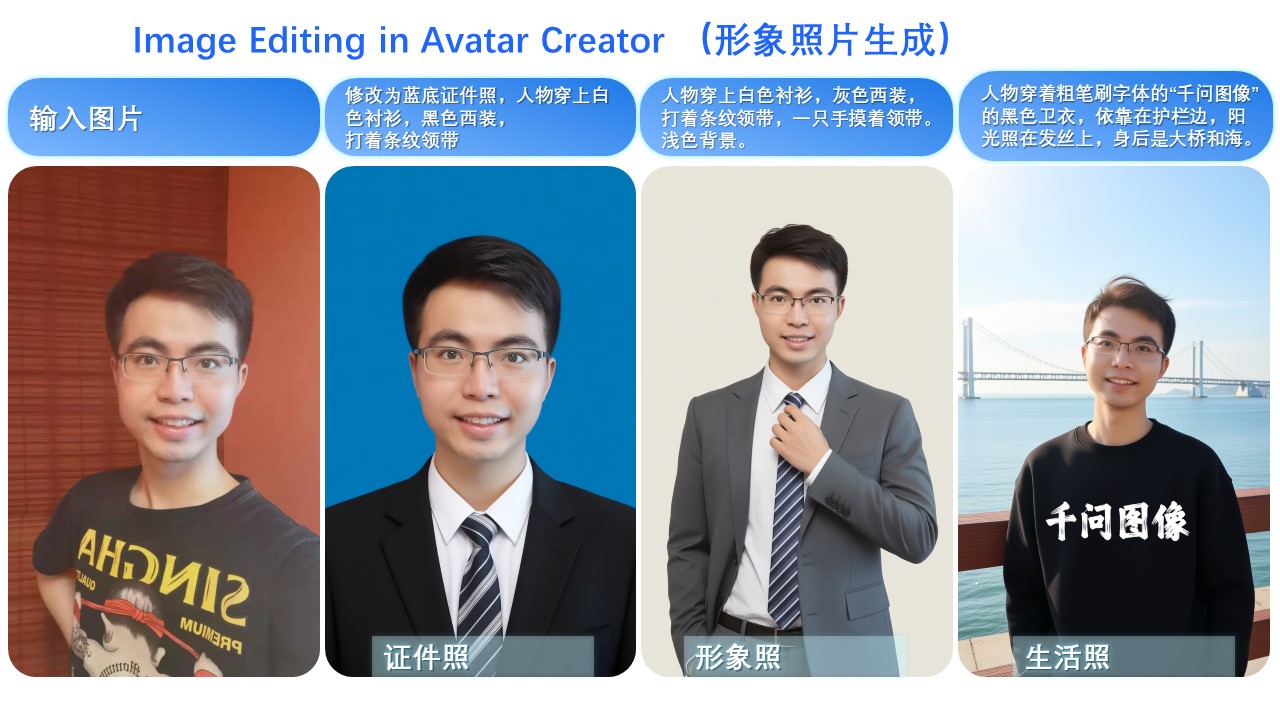
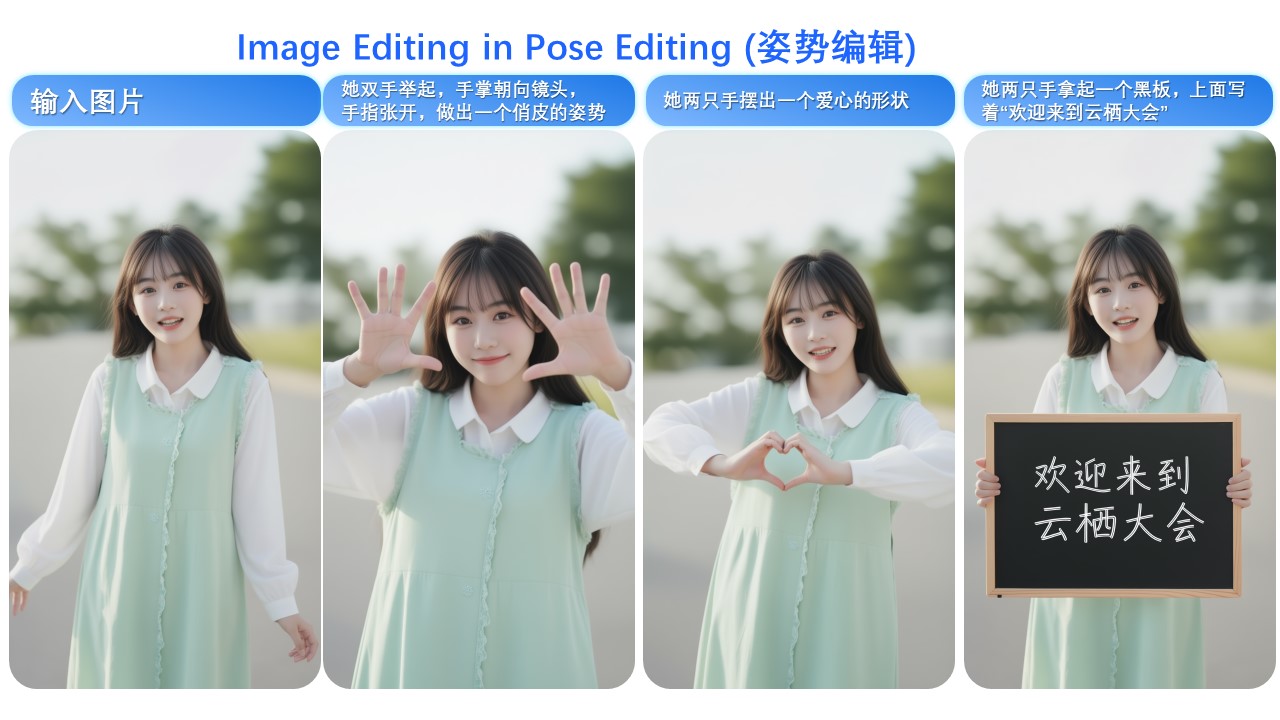
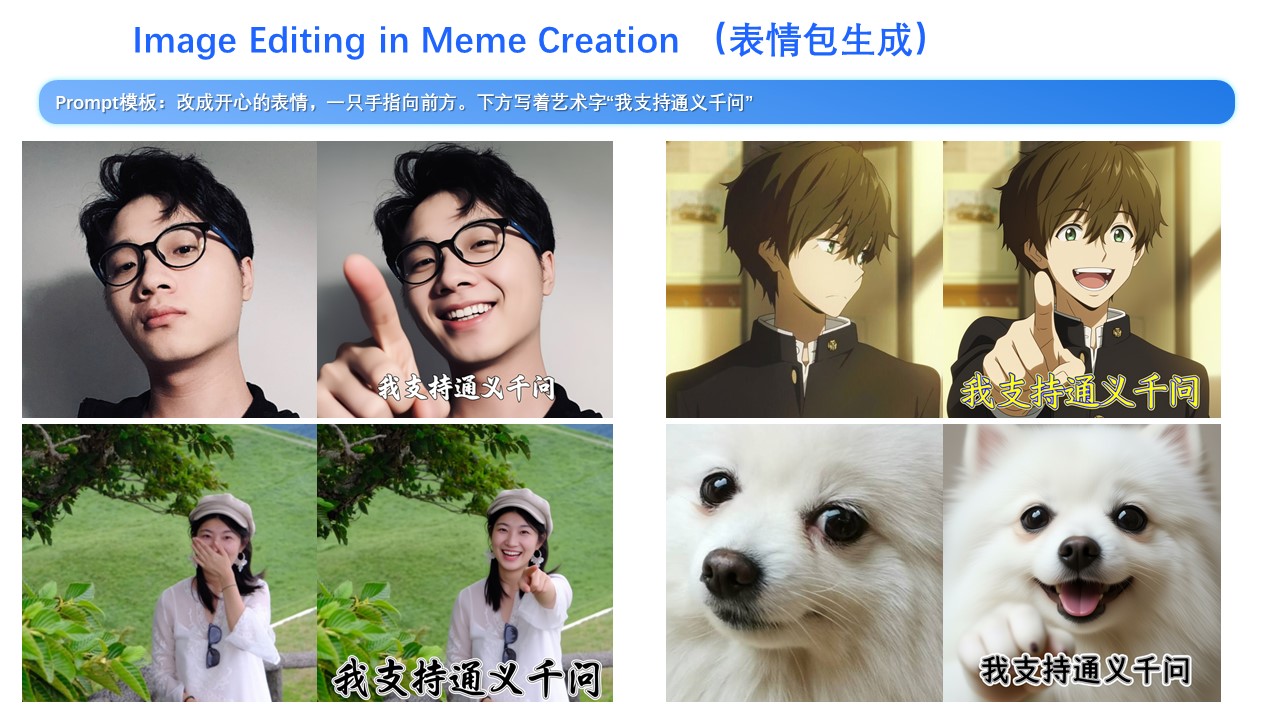
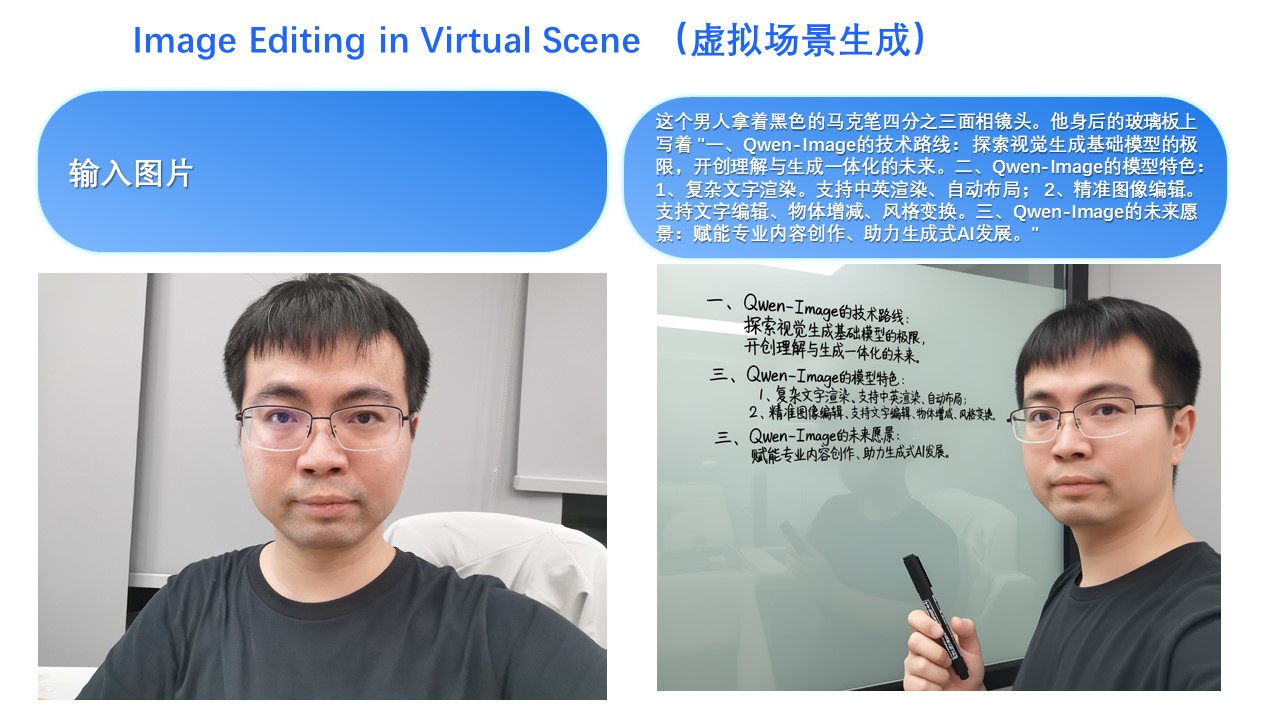
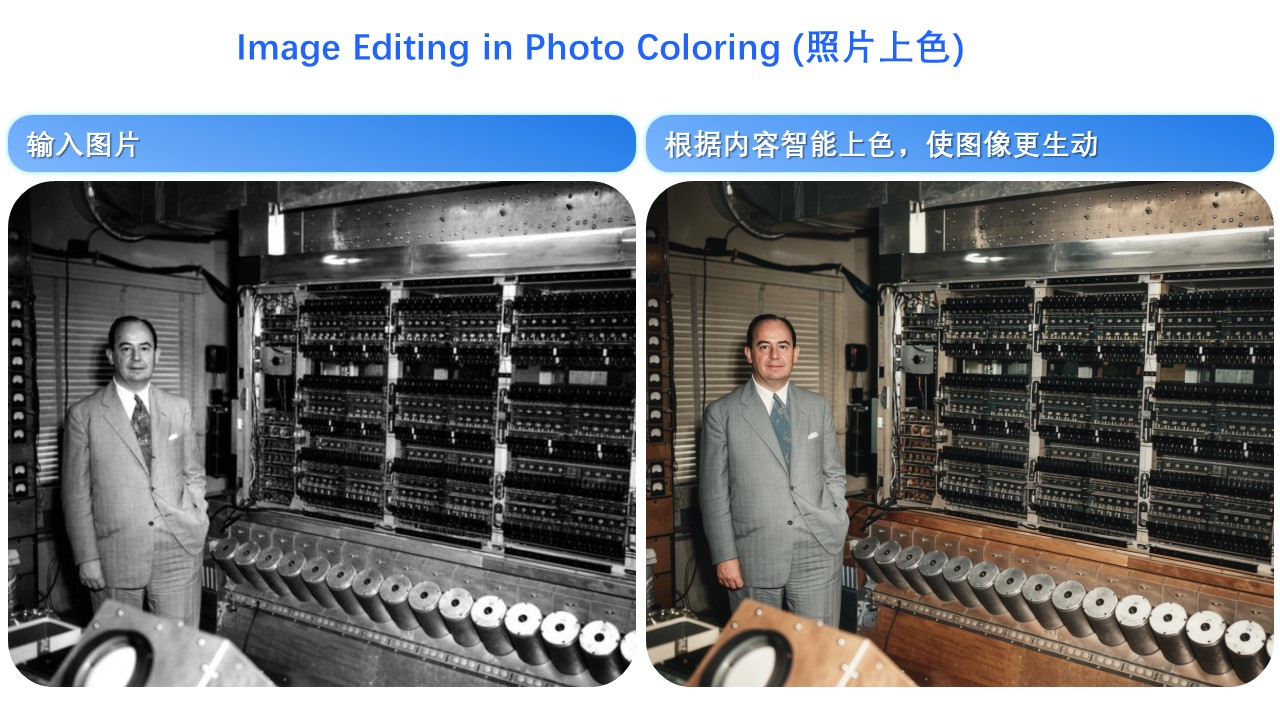
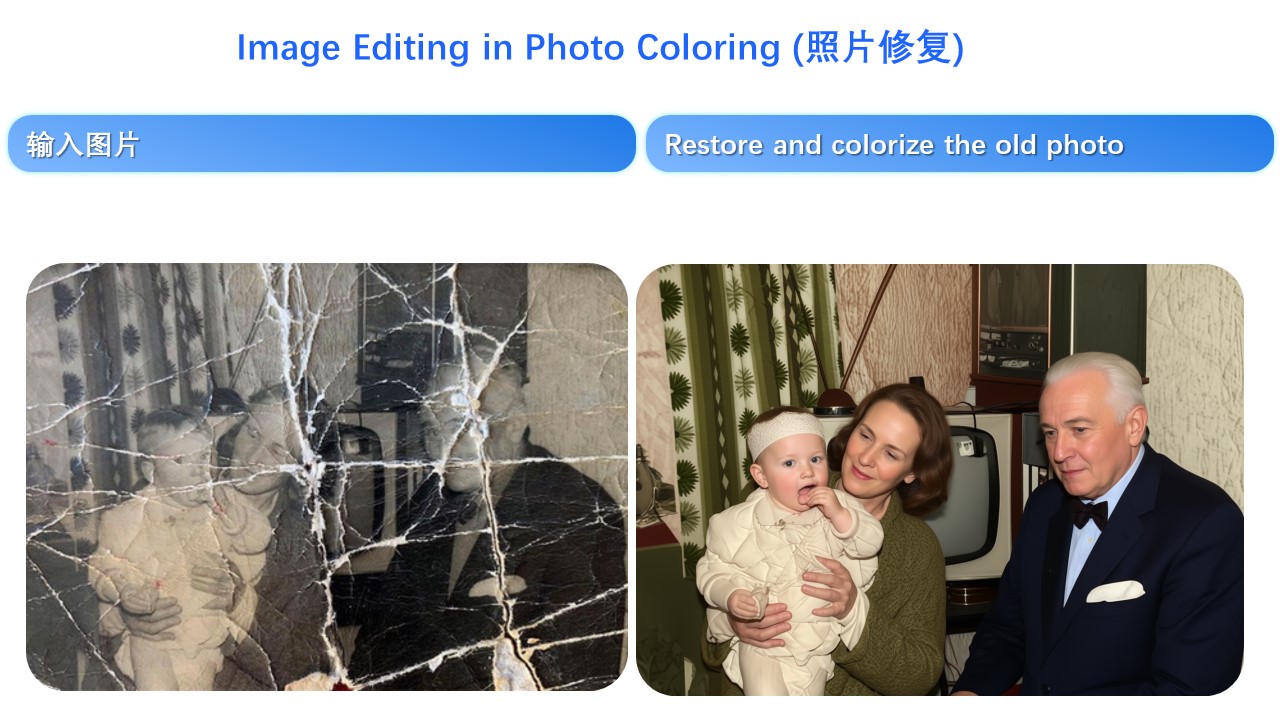
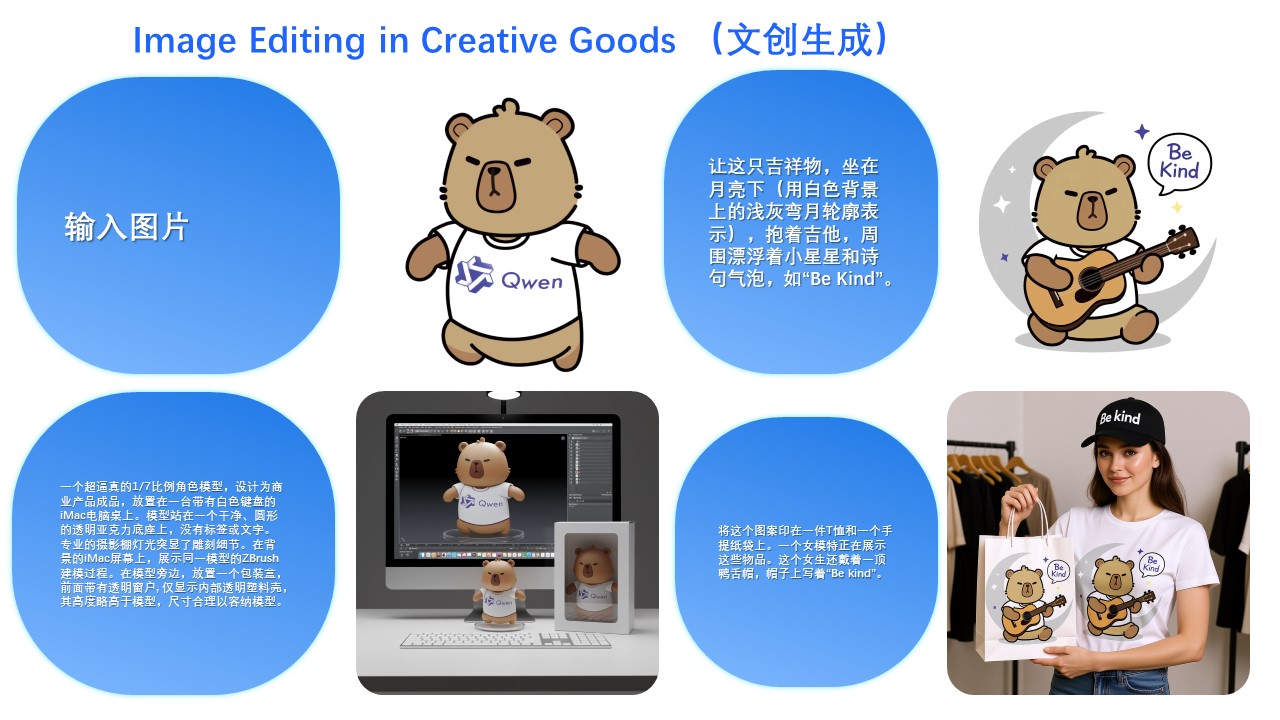
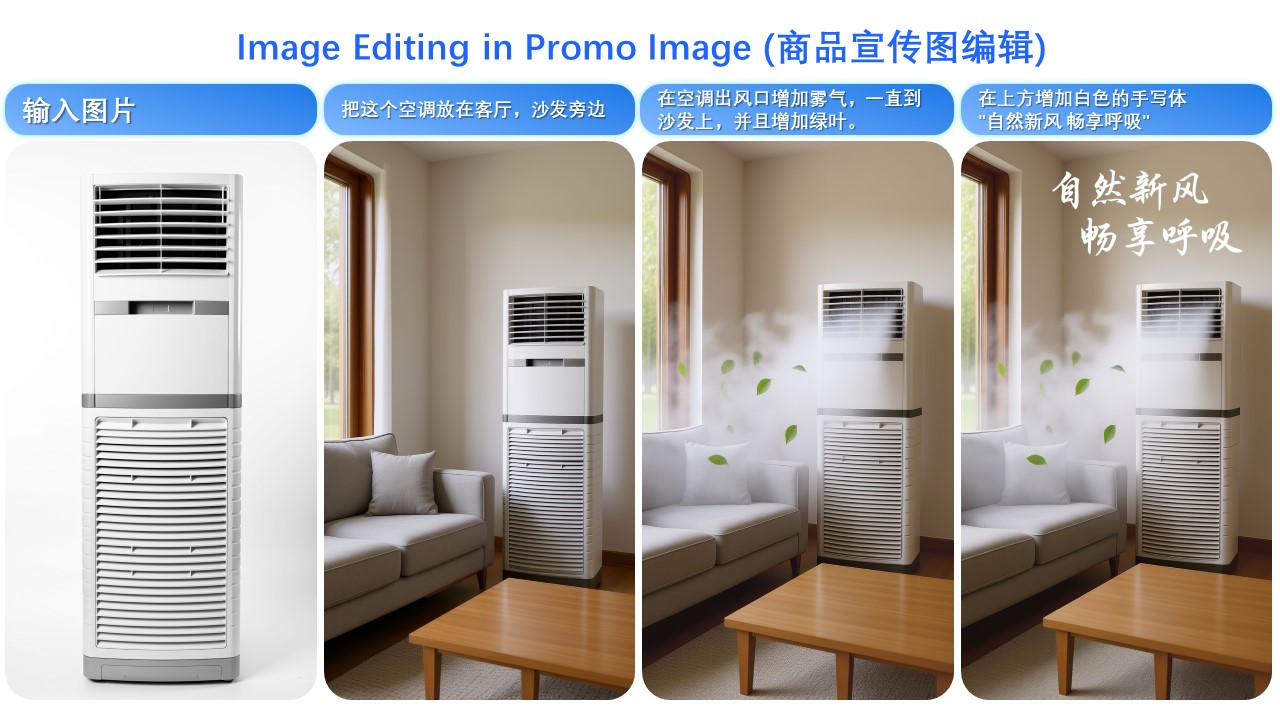
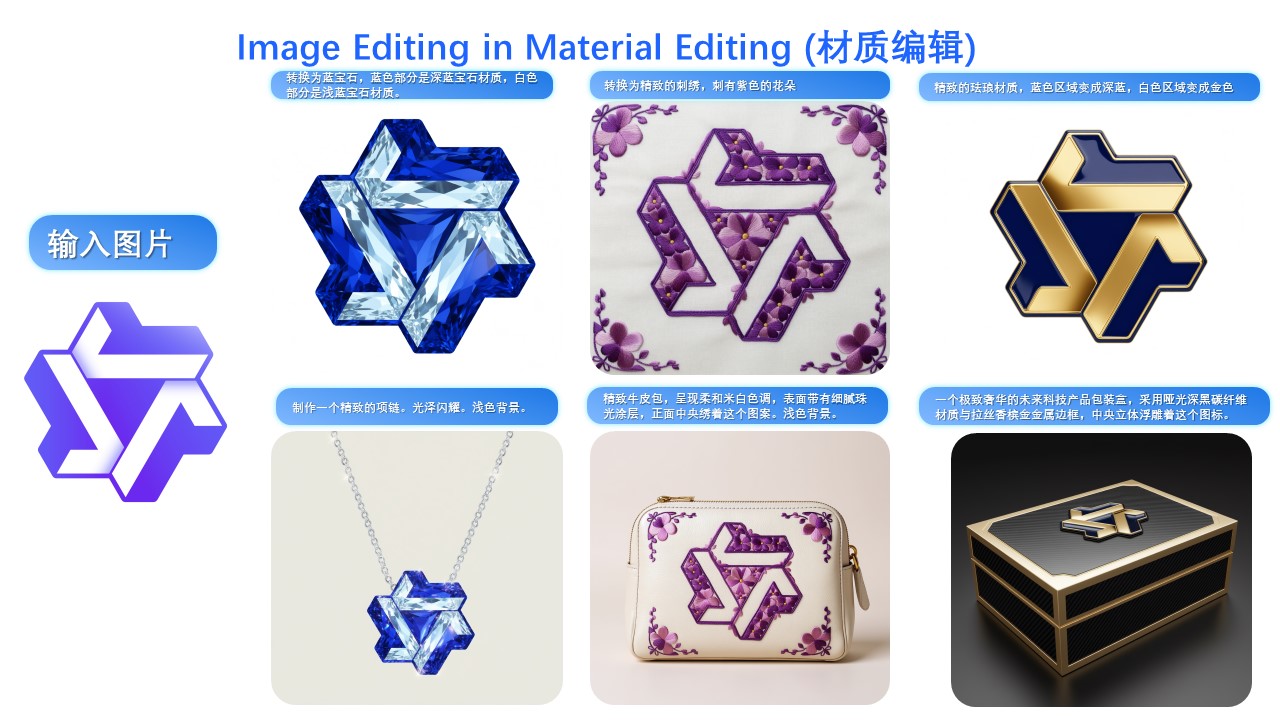
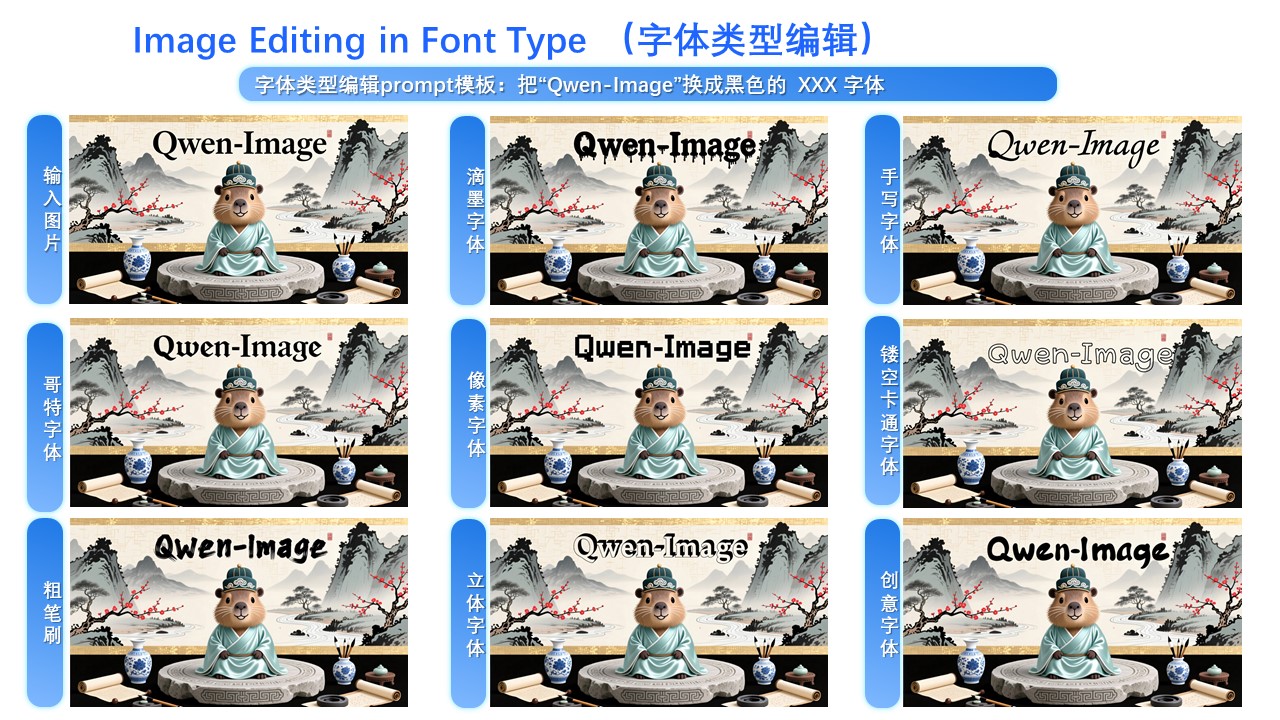
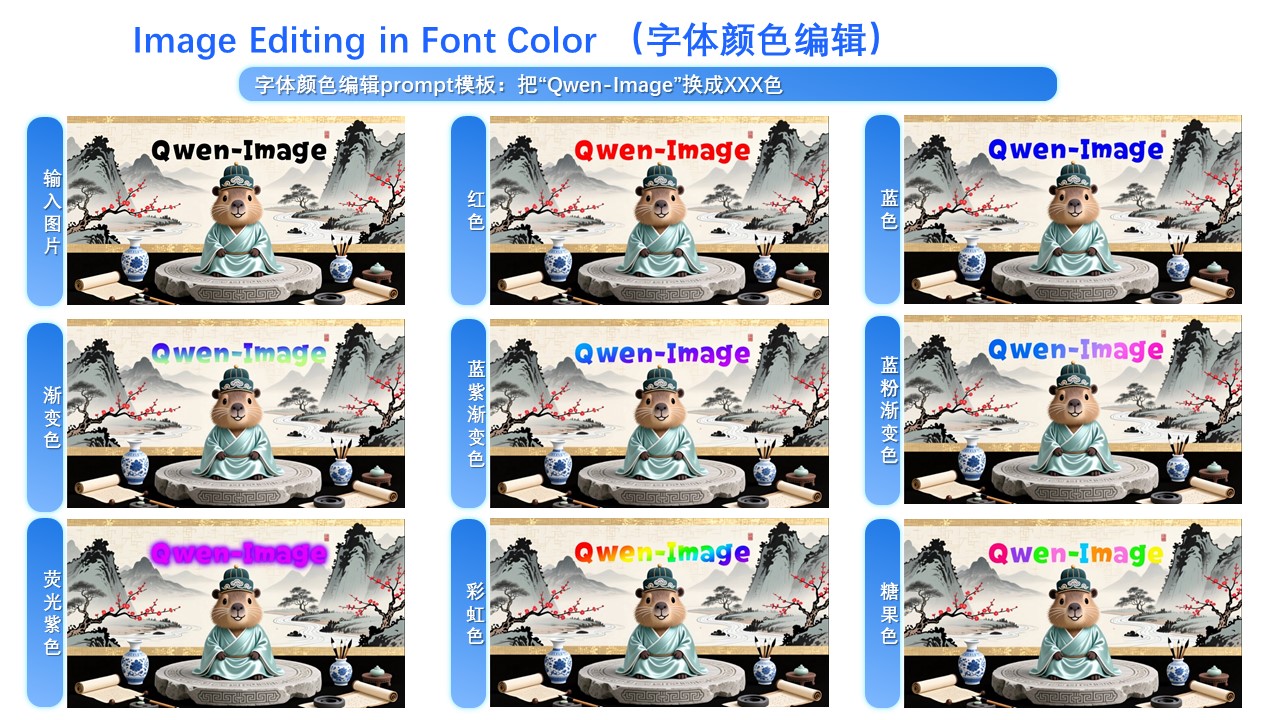
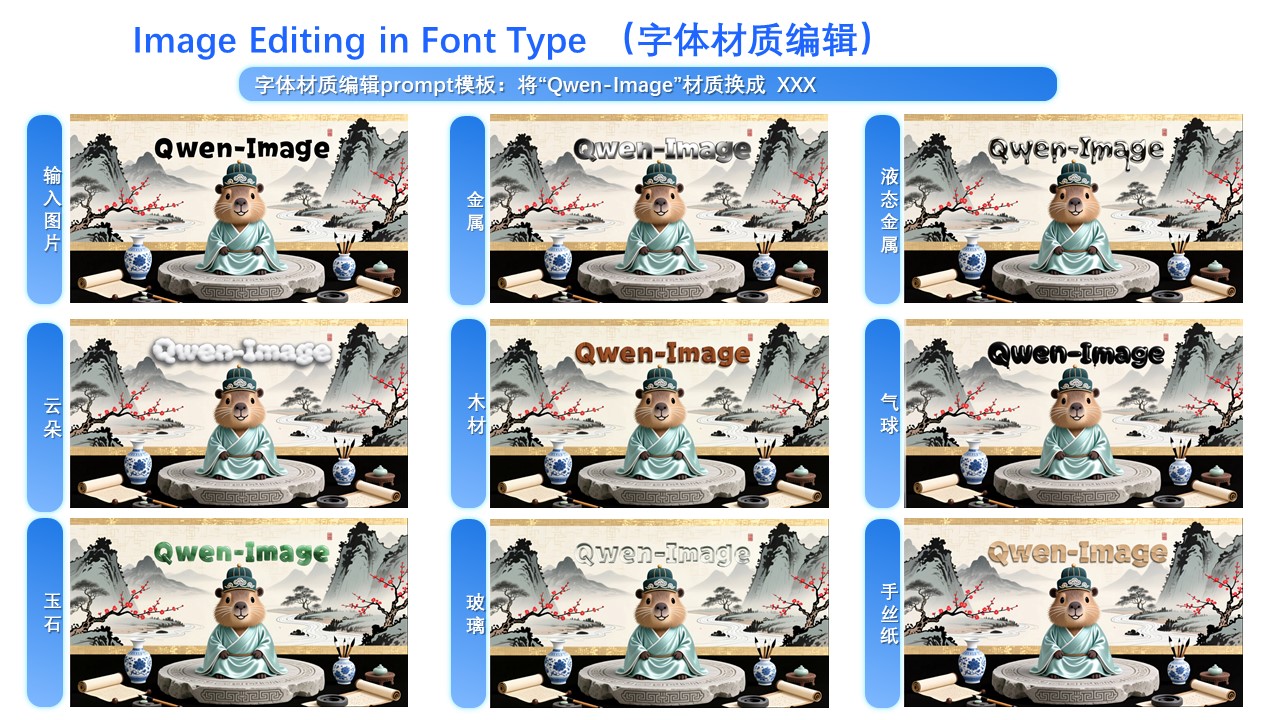
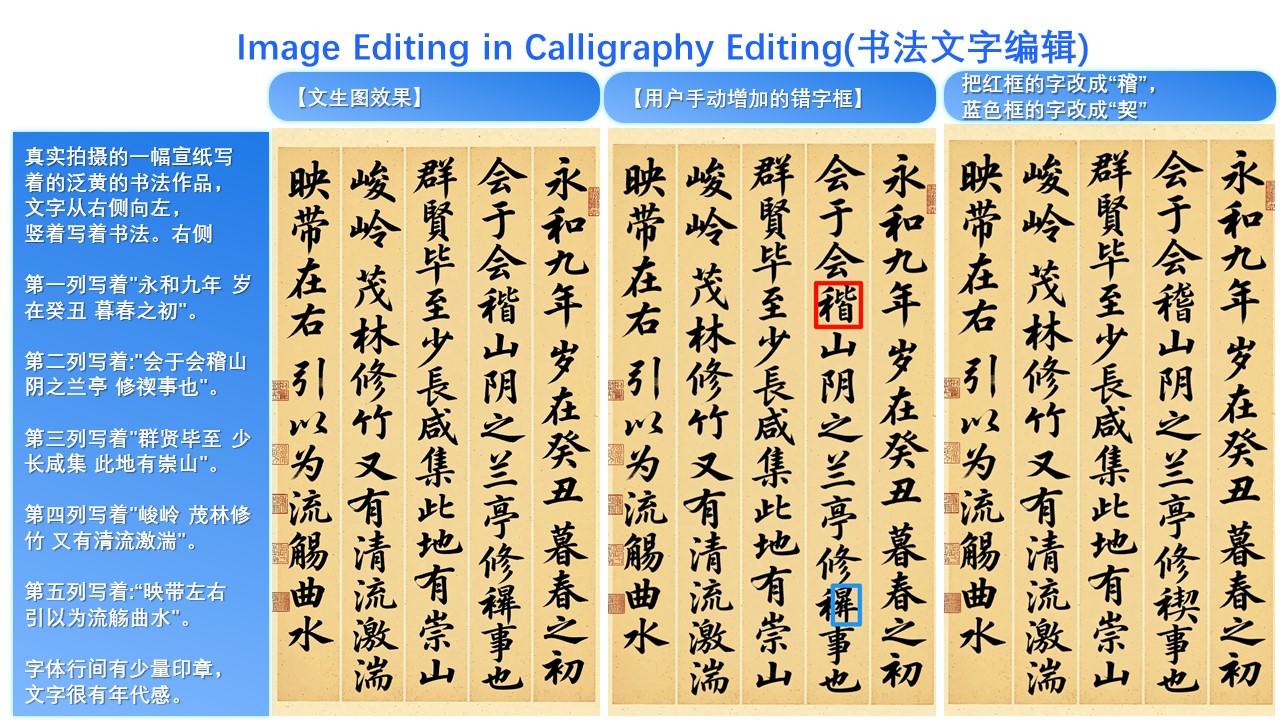
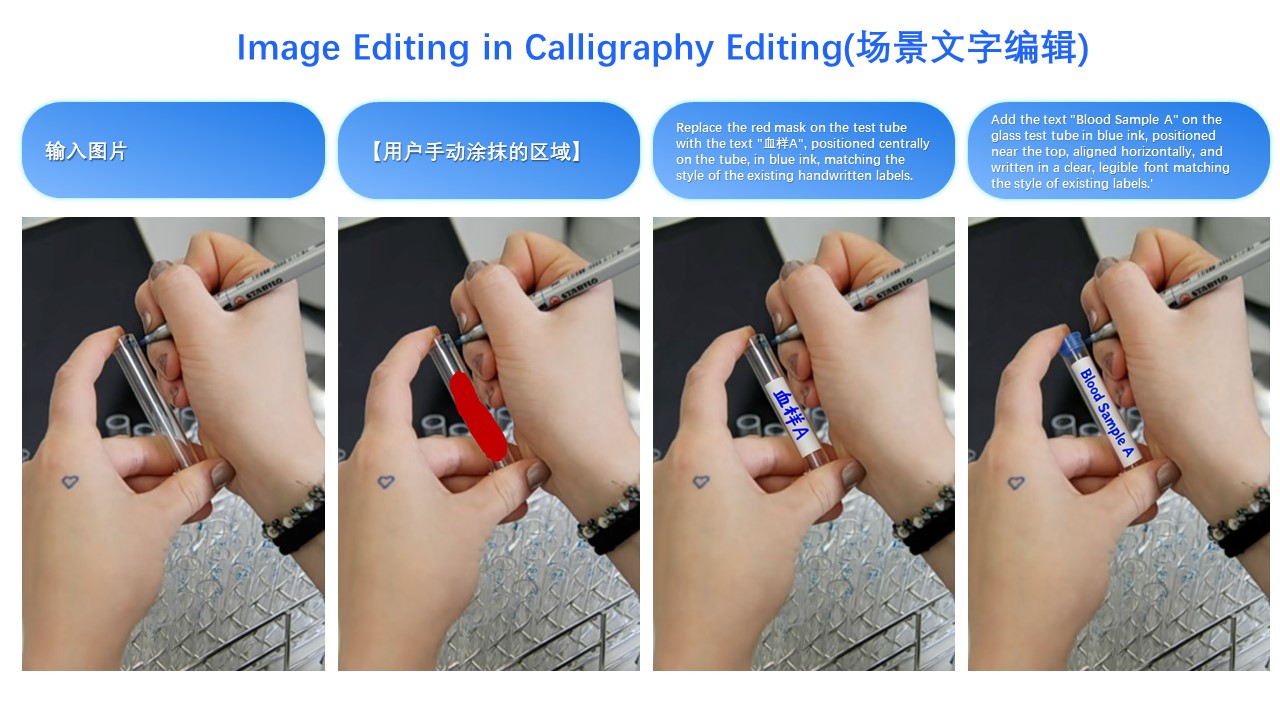
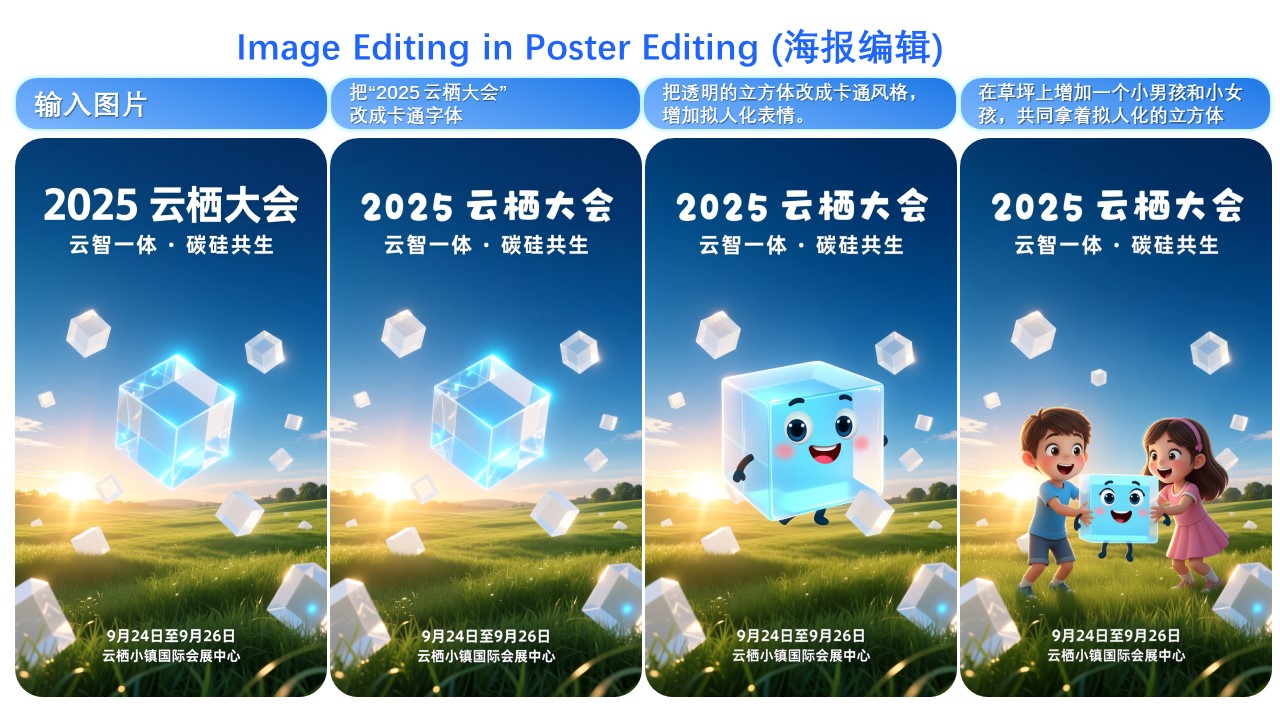
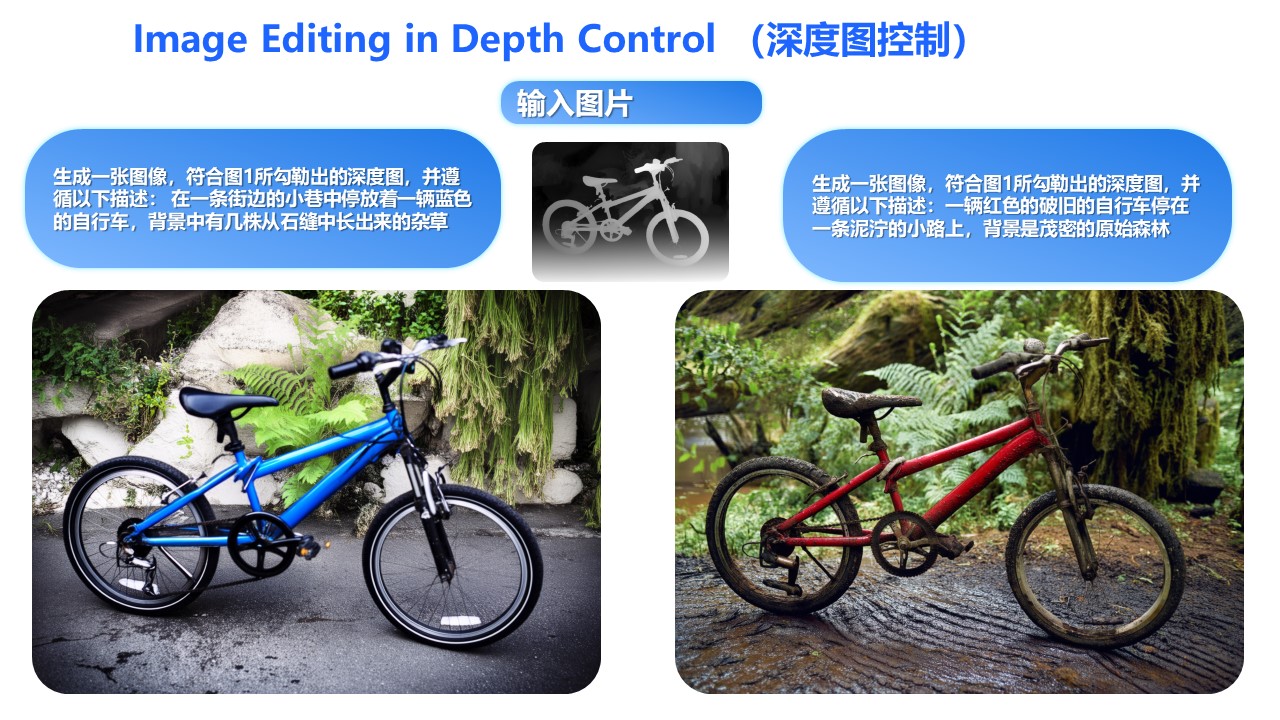
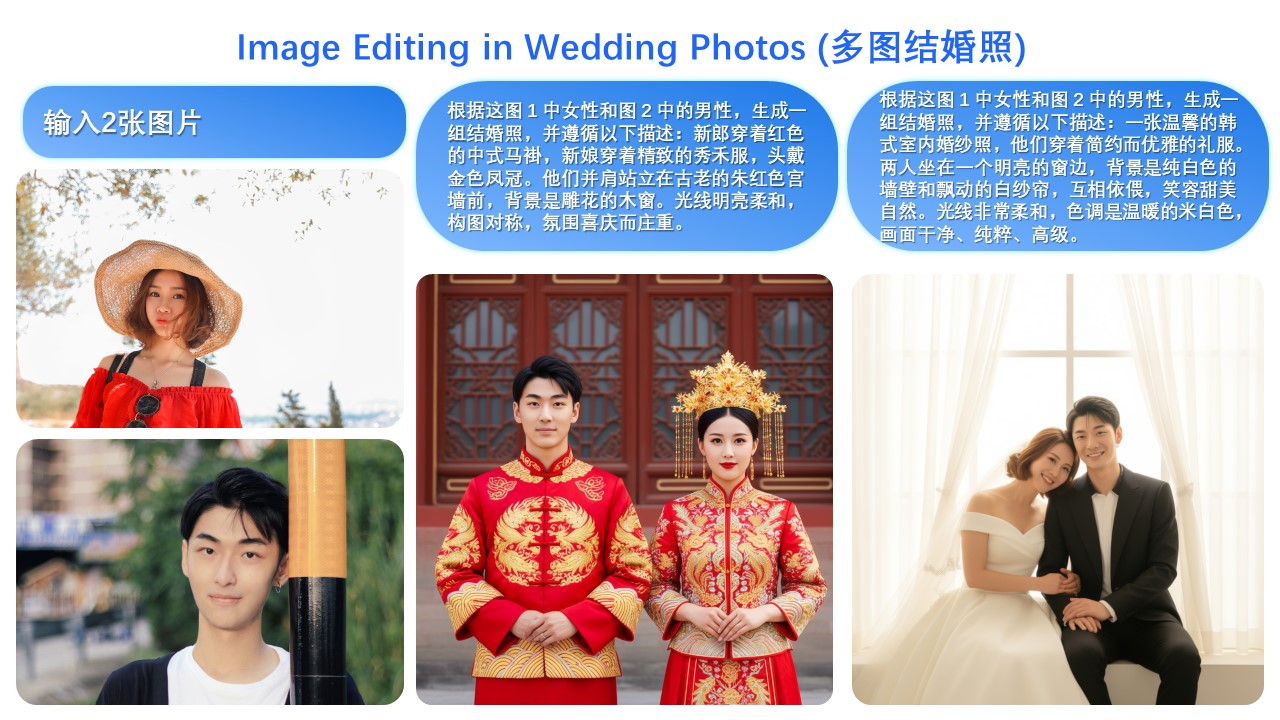
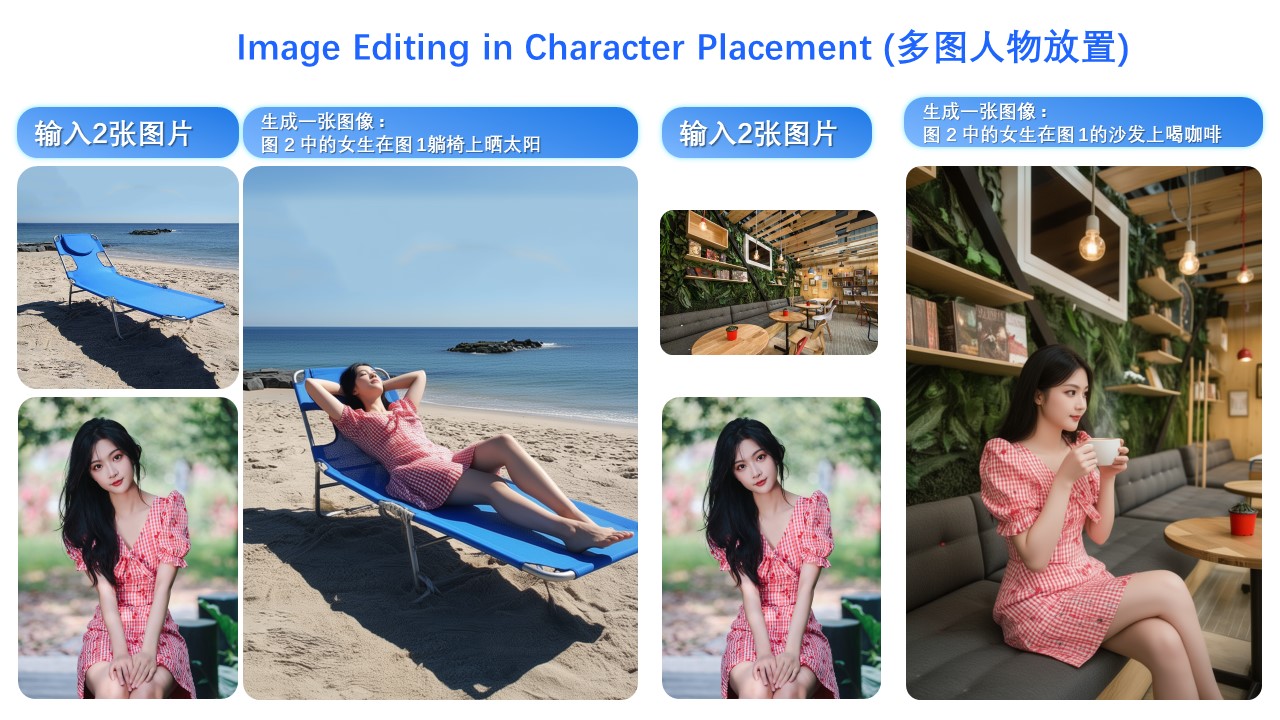
# Introduction This September, we are pleased to introduce Qwen-Image-Edit-2509, the monthly iteration of Qwen-Image-Edit. To experience the latest model, please visit [Qwen Chat](https://qwen.ai) and select the "Image Editing" feature. Compared with Qwen-Image-Edit released in August, the main improvements of Qwen-Image-Edit-2509 include: * **Multi-image Editing Support**: For multi-image inputs, Qwen-Image-Edit-2509 builds upon the Qwen-Image-Edit architecture and is further trained via image concatenation to enable multi-image editing. It supports various combinations such as "person + person," "person + product," and "person + scene." Optimal performance is currently achieved with 1 to 3 input images. * **Enhanced Single-image Consistency**: For single-image inputs, Qwen-Image-Edit-2509 significantly improves editing consistency, specifically in the following areas: - **Improved Person Editing Consistency**: Better preservation of facial identity, supporting various portrait styles and pose transformations; - **Improved Product Editing Consistency**: Better preservation of product identity, supporting product poster editing; - **Improved Text Editing Consistency**: In addition to modifying text content, it also supports editing text fonts, colors, and materials; * **Native Support for ControlNet**: Including depth maps, edge maps, keypoint maps, and more. ## Quick Start Install the latest version of diffusers

pip install git+https://github.com/huggingface/diffusers
The following contains a code snippet illustrating how to use `Qwen-Image-Edit-2509`:
import os
import torch
from PIL import Image
from diffusers import QwenImageEditPlusPipeline

pipeline = QwenImageEditPlusPipeline.from_pretrained("Qwen/Qwen-Image-Edit-2509", torch_dtype=torch.bfloat16)
print("pipeline loaded")

pipeline.to('cuda')
pipeline.set_progress_bar_config(disable=None)
image1 = Image.open("input1.png")
image2 = Image.open("input2.png")
prompt = "The magician bear is on the left, the alchemist bear is on the right, facing each other in the central park square."
inputs = {
    "image": [image1, image2],
    "prompt": prompt,
    "generator": torch.manual_seed(0),
    "true_cfg_scale": 4.0,
    "negative_prompt": " ",
    "num_inference_steps": 40,
    "guidance_scale": 1.0,
    "num_images_per_prompt": 1,
}
with torch.inference_mode():
    output = pipeline(**inputs)
    output_image = output.images[0]
    output_image.save("output_image_edit_plus.png")
    print("image saved at", os.path.abspath("output_image_edit_plus.png"))

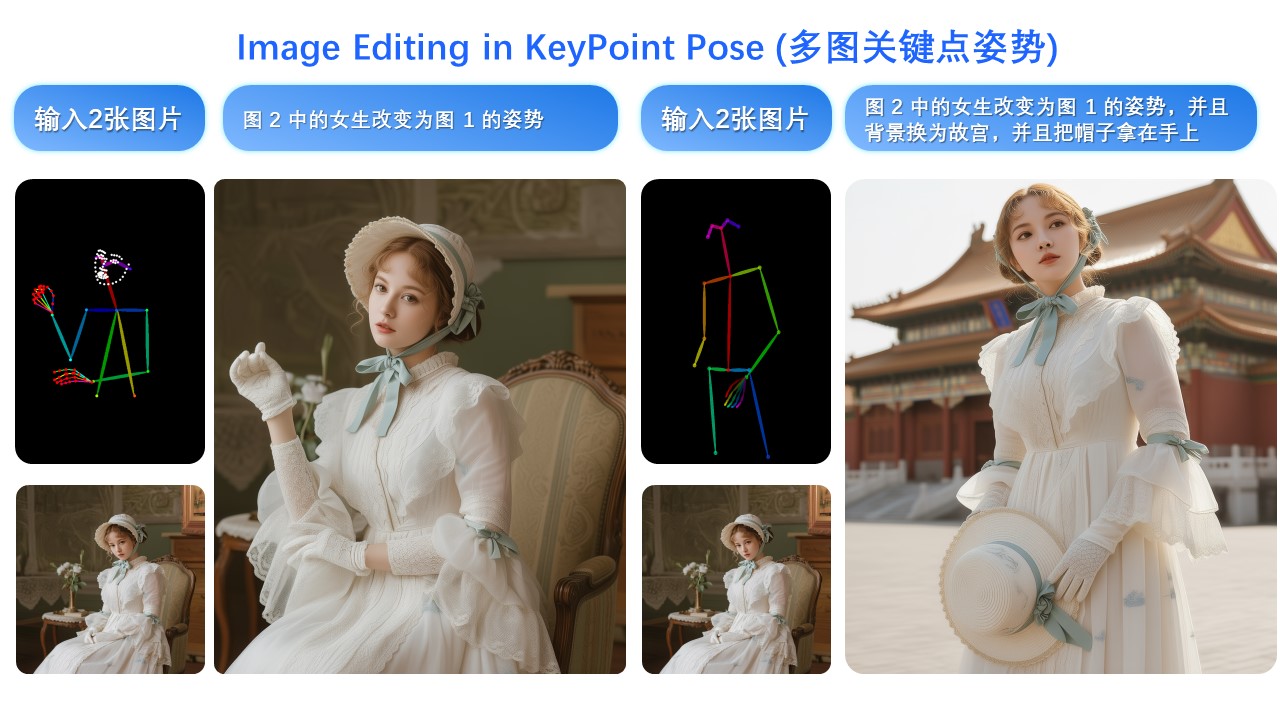
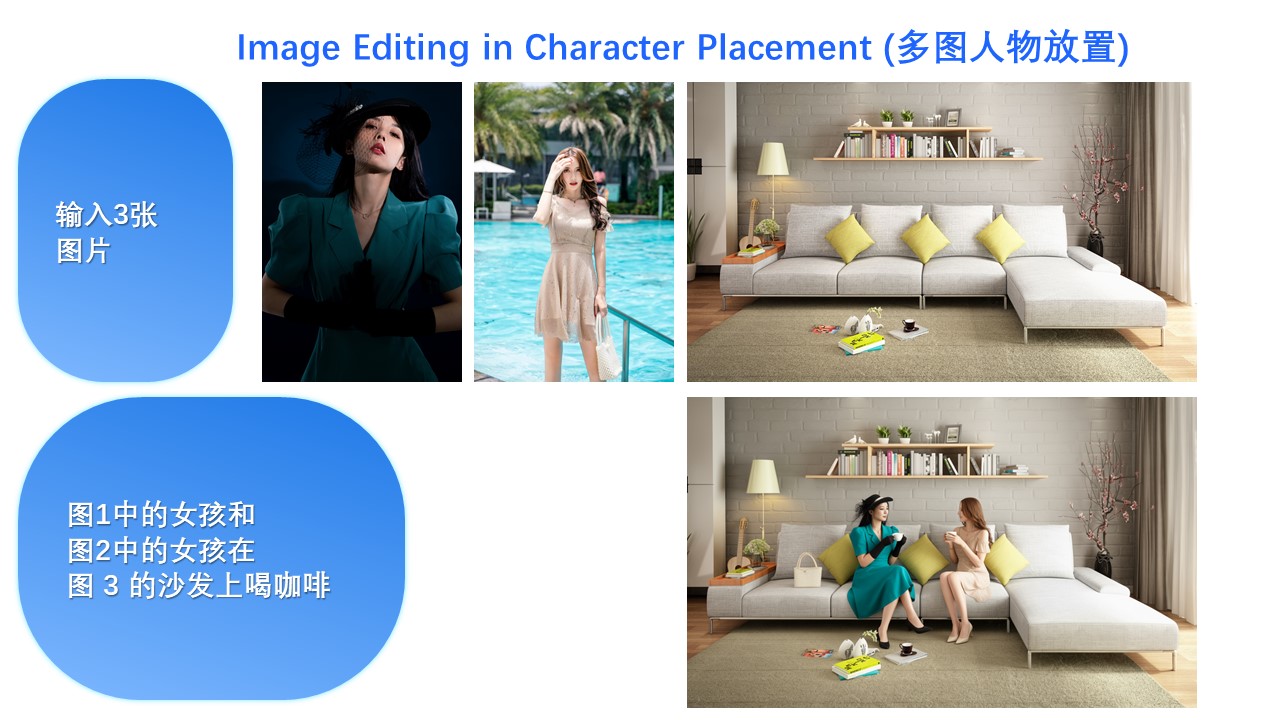
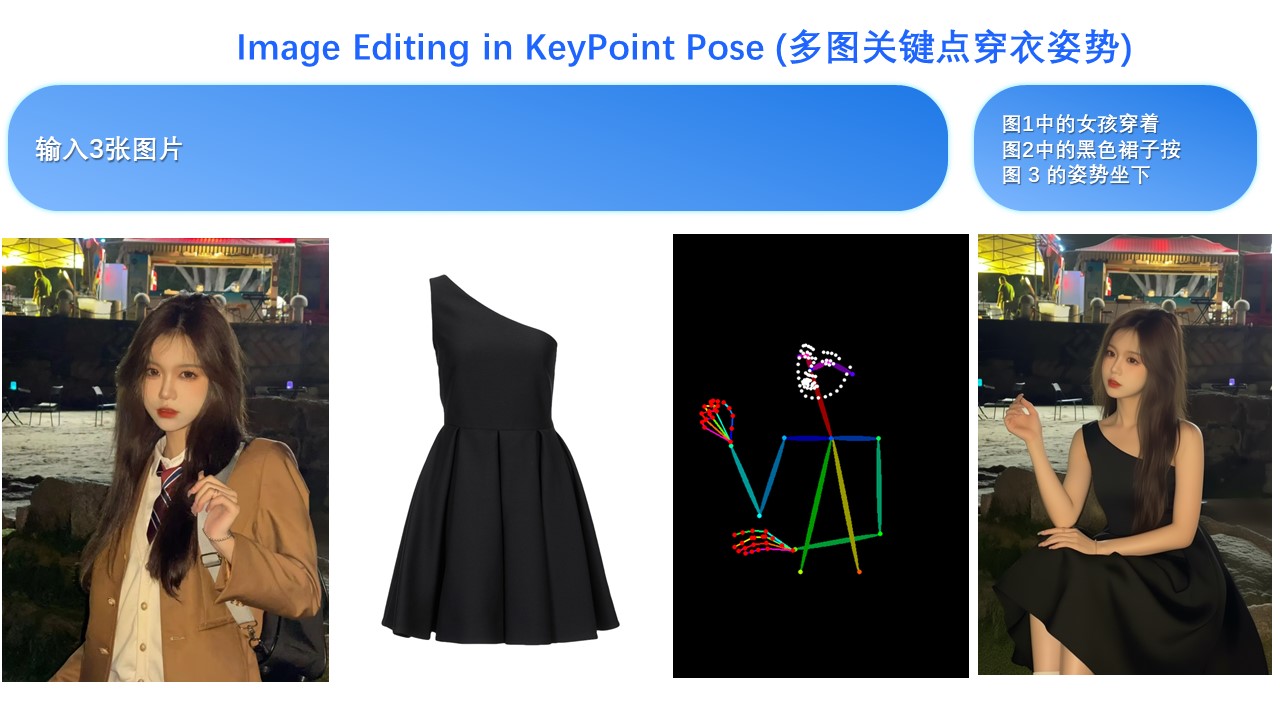
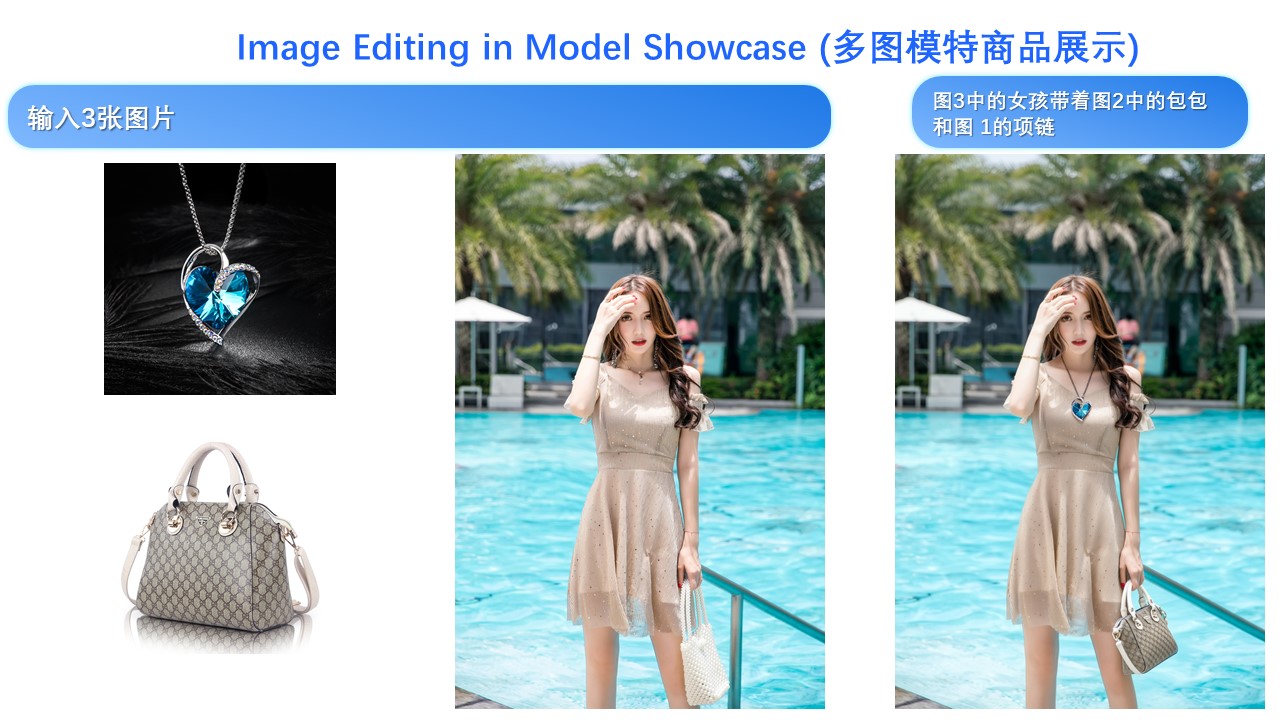
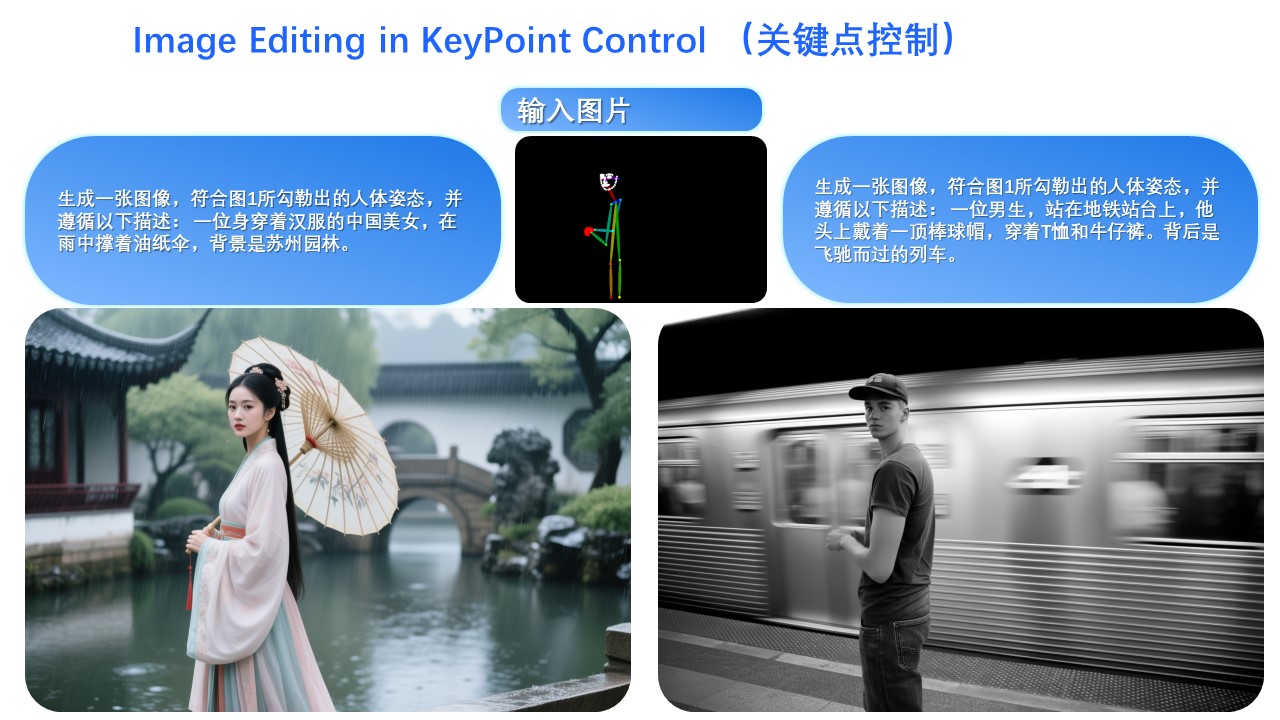
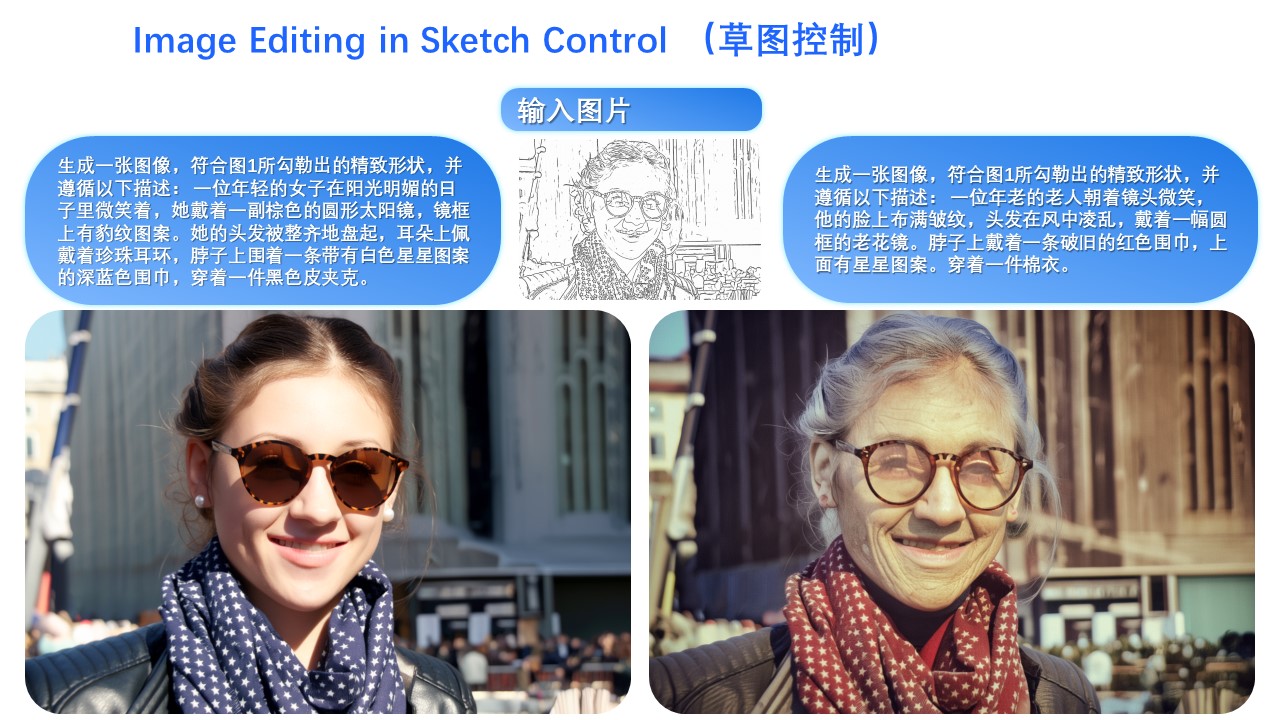
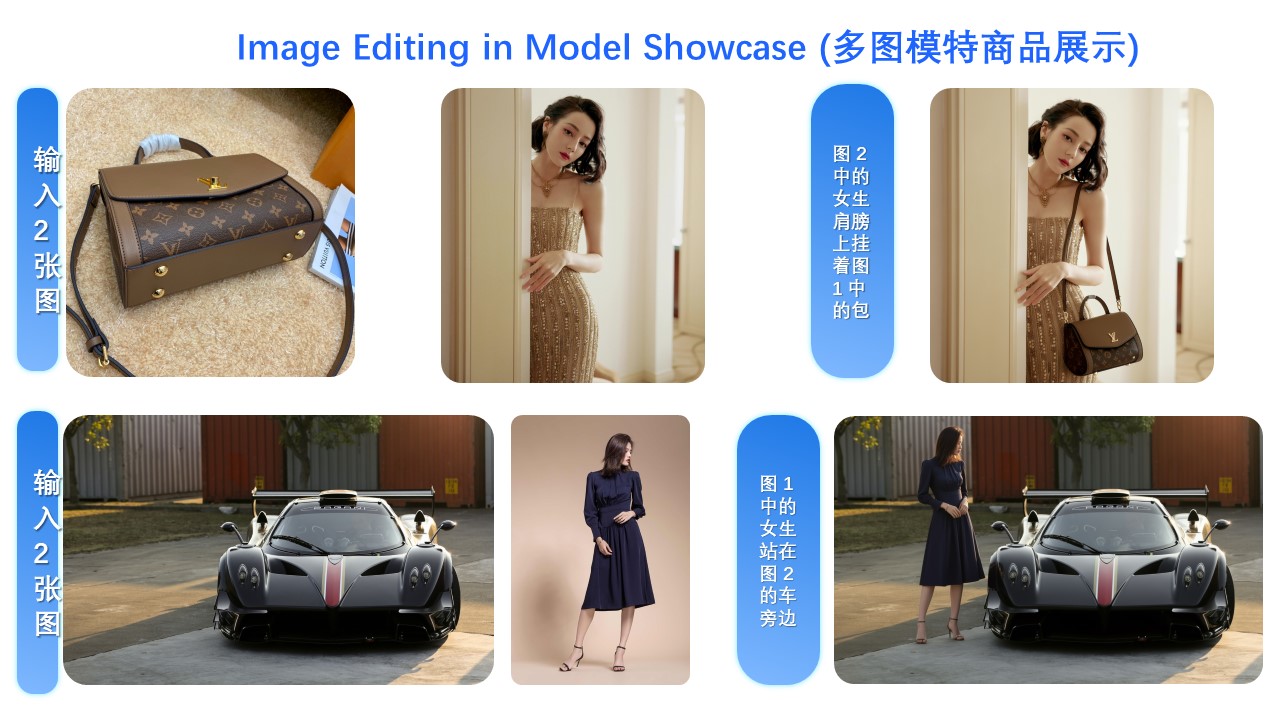
## Showcase **The primary update in Qwen-Image-Edit-2509 is support for multi-image inputs.** Let’s first look at a "person + person" example: ![Person + Person Example](https://qianwen-res.oss-cn-beijing.aliyuncs.com/Qwen-Image/edit2509/%E5%B9%BB%E7%81%AF%E7%89%8719.JPG#center) Here is a "person + scene" example: ![Person + Scene Example](https://qianwen-res.oss-cn-beijing.aliyuncs.com/Qwen-Image/edit2509/%E5%B9%BB%E7%81%AF%E7%89%8720.JPG#center) Below is a "person + object" example: ![Person + Object Example](https://qianwen-res.oss-cn-beijing.aliyuncs.com/Qwen-Image/edit2509/%E5%B9%BB%E7%81%AF%E7%89%8721.JPG#center) In fact, multi-image input also supports commonly used ControlNet keypoint maps—for example, changing a person’s pose: ![ControlNet Keypoint Example](https://qianwen-res.oss-cn-beijing.aliyuncs.com/Qwen-Image/edit2509/%E5%B9%BB%E7%81%AF%E7%89%8722.JPG#center) Similarly, the following examples demonstrate results using three input images: ![Three Images Example 1](https://qianwen-res.oss-cn-beijing.aliyuncs.com/Qwen-Image/edit2509/%E5%B9%BB%E7%81%AF%E7%89%8723.JPG#center) ![Three Images Example 2](https://qianwen-res.oss-cn-beijing.aliyuncs.com/Qwen-Image/edit2509/%E5%B9%BB%E7%81%AF%E7%89%8724.JPG#center) ![Three Images Example 3](https://qianwen-res.oss-cn-beijing.aliyuncs.com/Qwen-Image/edit2509/%E5%B9%BB%E7%81%AF%E7%89%8725.JPG#center) --- **Another major update in Qwen-Image-Edit-2509 is enhanced consistency.** First, regarding person consistency, Qwen-Image-Edit-2509 shows significant improvement over Qwen-Image-Edit. Below are examples generating various portrait styles: ![Portrait Styles Example](https://qianwen-res.oss-cn-beijing.aliyuncs.com/Qwen-Image/edit2509/%E5%B9%BB%E7%81%AF%E7%89%871.JPG#center) For instance, changing a person’s pose while maintaining excellent identity consistency: ![Pose Change with Identity Consistency](https://qianwen-res.oss-cn-beijing.aliyuncs.com/Qwen-Image/edit2509/%E5%B9%BB%E7%81%AF%E7%89%872.JPG#center) Leveraging this improvement along with Qwen-Image’s unique text rendering capability, we find that Qwen-Image-Edit-2509 excels at creating meme images: ![Meme Image Example](https://qianwen-res.oss-cn-beijing.aliyuncs.com/Qwen-Image/edit2509/%E5%B9%BB%E7%81%AF%E7%89%873.JPG#center) Of course, even with longer text, Qwen-Image-Edit-2509 can still render it while preserving the person’s identity: ![Long Text with Identity Preservation](https://qianwen-res.oss-cn-beijing.aliyuncs.com/Qwen-Image/edit2509/%E5%B9%BB%E7%81%AF%E7%89%874.JPG#center) Person consistency is also evident in old photo restoration. Below are two examples: ![Old Photo Restoration 1](https://qianwen-res.oss-cn-beijing.aliyuncs.com/Qwen-Image/edit2509/%E5%B9%BB%E7%81%AF%E7%89%8717.JPG#center) ![Old Photo Restoration 2](https://qianwen-res.oss-cn-beijing.aliyuncs.com/Qwen-Image/edit2509/%E5%B9%BB%E7%81%AF%E7%89%8718.JPG#center) Naturally, besides real people, generating cartoon characters and cultural creations is also possible: ![Cartoon & Cultural Creation](https://qianwen-res.oss-cn-beijing.aliyuncs.com/Qwen-Image/edit2509/%E5%B9%BB%E7%81%AF%E7%89%8715.JPG#center) Second, Qwen-Image-Edit-2509 specifically enhances product consistency. We find that the model can naturally generate product posters from plain-background product images: ![Product Poster Example](https://qianwen-res.oss-cn-beijing.aliyuncs.com/Qwen-Image/edit2509/%E5%B9%BB%E7%81%AF%E7%89%875.JPG#center) Or even simple logos: ![Logo Generation Example](https://qianwen-res.oss-cn-beijing.aliyuncs.com/Qwen-Image/edit2509/%E5%B9%BB%E7%81%AF%E7%89%8716.JPG#center) Third, Qwen-Image-Edit-2509 specifically enhances text consistency and supports editing font type, font color, and font material: ![Text Font Type](https://qianwen-res.oss-cn-beijing.aliyuncs.com/Qwen-Image/edit2509/%E5%B9%BB%E7%81%AF%E7%89%8710.JPG#center) ![Text Font Color](https://qianwen-res.oss-cn-beijing.aliyuncs.com/Qwen-Image/edit2509/%E5%B9%BB%E7%81%AF%E7%89%8711.JPG#center) ![Text Font Material](https://qianwen-res.oss-cn-beijing.aliyuncs.com/Qwen-Image/edit2509/%E5%B9%BB%E7%81%AF%E7%89%8712.JPG#center) Moreover, the ability for precise text editing has been significantly enhanced: ![Precise Text Editing 1](https://qianwen-res.oss-cn-beijing.aliyuncs.com/Qwen-Image/edit2509/%E5%B9%BB%E7%81%AF%E7%89%8713.JPG#center) ![Precise Text Editing 2](https://qianwen-res.oss-cn-beijing.aliyuncs.com/Qwen-Image/edit2509/%E5%B9%BB%E7%81%AF%E7%89%8714.JPG#center) It is worth noting that text editing can often be seamlessly integrated with image editing—for example, in this poster editing case: ![Integrated Text & Image Editing](https://qianwen-res.oss-cn-beijing.aliyuncs.com/Qwen-Image/edit2509/%E5%B9%BB%E7%81%AF%E7%89%876.JPG#center) --- **The final update in Qwen-Image-Edit-2509 is native support for commonly used ControlNet image conditions, such as keypoint control and sketches:** ![Keypoint Control Example](https://qianwen-res.oss-cn-beijing.aliyuncs.com/Qwen-Image/edit2509/%E5%B9%BB%E7%81%AF%E7%89%877.JPG#center) ![Sketch Control Example 1](https://qianwen-res.oss-cn-beijing.aliyuncs.com/Qwen-Image/edit2509/%E5%B9%BB%E7%81%AF%E7%89%878.JPG#center) ![Sketch Control Example 2](https://qianwen-res.oss-cn-beijing.aliyuncs.com/Qwen-Image/edit2509/%E5%B9%BB%E7%81%AF%E7%89%879.JPG#center) ## License Agreement Qwen-Image is licensed under Apache 2.0. ## Citation We kindly encourage citation of our work if you find it useful.
@misc{wu2025qwenimagetechnicalreport,
      title={Qwen-Image Technical Report}, 
      author={Chenfei Wu and Jiahao Li and Jingren Zhou and Junyang Lin and Kaiyuan Gao and Kun Yan and Sheng-ming Yin and Shuai Bai and Xiao Xu and Yilei Chen and Yuxiang Chen and Zecheng Tang and Zekai Zhang and Zhengyi Wang and An Yang and Bowen Yu and Chen Cheng and Dayiheng Liu and Deqing Li and Hang Zhang and Hao Meng and Hu Wei and Jingyuan Ni and Kai Chen and Kuan Cao and Liang Peng and Lin Qu and Minggang Wu and Peng Wang and Shuting Yu and Tingkun Wen and Wensen Feng and Xiaoxiao Xu and Yi Wang and Yichang Zhang and Yongqiang Zhu and Yujia Wu and Yuxuan Cai and Zenan Liu},
      year={2025},
      eprint={2508.02324},
      archivePrefix={arXiv},
      primaryClass={cs.CV},
      url={https://arxiv.org/abs/2508.02324}, 
}

Identity and Version

Repository
Smallthrow22/Qwen-Image-Edit-2509
Publisher
Throw
Task
Image to image
Modality
Image
Library
diffusers
Parameters
20.4B parameters
Languages
en, zh
Revision
b32d04e4d6f58cb23221dd865a73a7f515613a81
First published
2026-10-03
Last updated
2026-10-03

Files and Weights

35 files, 57.7 GB in total. The weights are 10 files totalling 57.7 GB in safetensors.

Weights10 files · 57.7 GB
Configuration14 files · 266.2 KB
Tokenizer7 files · 20.9 MB
Documentation1 file · 10.3 KB
Other2 files · 3.4 KB
Repository1 file · 1.6 KB
Every file
FileTypeSizeSHA-256
text_encoder/model-00001-of-00004.safetensorsWeights5.0 GB d725335e4ea2
text_encoder/model-00002-of-00004.safetensorsWeights5.0 GB b1830db6908d
text_encoder/model-00003-of-00004.safetensorsWeights4.9 GB 09c1807c6d00
text_encoder/model-00004-of-00004.safetensorsWeights1.7 GB 5dd068336d14
transformer/diffusion_pytorch_model-00001-of-00005.safetensorsWeights10.0 GB 784a8efc4dce
transformer/diffusion_pytorch_model-00002-of-00005.safetensorsWeights10.0 GB 86ce21e5e3bd
transformer/diffusion_pytorch_model-00003-of-00005.safetensorsWeights10.0 GB c6a046daa991
transformer/diffusion_pytorch_model-00004-of-00005.safetensorsWeights9.9 GB c28bf871d5db
transformer/diffusion_pytorch_model-00005-of-00005.safetensorsWeights982.1 MB dd2844e5cafb
vae/diffusion_pytorch_model.safetensorsWeights253.8 MB 0c8bc8b758c6
model_index.jsonConfiguration516 B —
processor/added_tokens.jsonConfiguration605 B —
processor/preprocessor_config.jsonConfiguration788 B —
processor/special_tokens_map.jsonConfiguration613 B —
processor/video_preprocessor_config.jsonConfiguration904 B —
scheduler/scheduler_config.jsonConfiguration485 B —
text_encoder/config.jsonConfiguration3.2 KB —
text_encoder/generation_config.jsonConfiguration244 B —
text_encoder/model.safetensors.index.jsonConfiguration57.7 KB —
tokenizer/added_tokens.jsonConfiguration605 B —
tokenizer/special_tokens_map.jsonConfiguration613 B —
transformer/config.jsonConfiguration339 B —
transformer/diffusion_pytorch_model.safetensors.index.jsonConfiguration198.9 KB —
vae/config.jsonConfiguration730 B —
README.mdDocumentation10.3 KB —
processor/chat_template.jinjaOther1.0 KB —
tokenizer/chat_template.jinjaOther2.4 KB —
.gitattributesRepository1.6 KB —
processor/merges.txtTokenizer1.7 MB —
processor/tokenizer.jsonTokenizer11.4 MB 9c5ae00e602b
processor/tokenizer_config.jsonTokenizer4.7 KB —
processor/vocab.jsonTokenizer2.8 MB —
tokenizer/merges.txtTokenizer1.7 MB —
tokenizer/tokenizer_config.jsonTokenizer4.7 KB —
tokenizer/vocab.jsonTokenizer3.4 MB —

License and Download

License
apache-2.0
Access
Open weights, no gate
Download size
57.7 GB
Download from Throw

Released by Throw through its official repository on Hugging Face. Read the license.

Built From

Memory Requirements

PrecisionWeights in memory
As published57.7 GB
16-bit40.9 GB
8-bit20.4 GB
4-bit10.2 GB

Weights only, from the published parameter count; the key-value cache and runtime add to this.

Questions About Qwen-Image-Edit-2509

How much GPU memory does Qwen-Image-Edit-2509 need?

About 49 GB at 16-bit and 12.3 GB at 4-bit: the weights (20.4B parameters) plus a working margin. A long context needs more.

What is the cheapest GPU to run Qwen-Image-Edit-2509 on?

At 16-bit, 1x MI300X from $1.85 an hour; at 4-bit, 1x MI300X from $1.85 an hour, at the lowest on-demand prices the SAVRN Index lists.

Can I use Qwen-Image-Edit-2509 commercially?

Yes. Qwen-Image-Edit-2509 is released under Apache License 2.0. The Apache License 2.0 is a permissive open-source license. It permits commercial use, modification and redistribution. It requires keeping the license and copyright notices and any NOTICE file, stating significant changes, and it includes an express patent grant from contributors.

Similar Models

Model · Image to image

Marigold-v2-Qwen-VAE-FlashPack

Fal

This September, we are pleased to introduce Qwen-Image-Edit-2509, the monthly iteration of Qwen-Image-Edit. To experience the latest model, please visit Qwen Chat and select the "Image Editing" feature. Compared with Qwen-Image-Edit released in August, the main improvements of Qwen-Image-Edit-2509 include: Install the latest version of diffusers The following contains a code snippet illustrating how to use Qwen-Image-Edit-2509: The primary update in Qwen-Image-Edit-2509 is support for multi-image inputs. Let’s first look at a "person + person" example: Here is a "person + scene" example: Below is a "person + object" example: In fact, multi-image input also supports commonly used ControlNet…
Open weights apache-2.0 20.4B parameters diffusers

Model · Image to image

flux-3-image-klein

Black Forest Labs

FLUX 3 Image Klein is a 5.6B open weights model for text-to-image generation and image editing. It takes a prompt and up to 10 reference images and returns one image. Text-to-image, single-reference edits and multi-reference compositions run through the same model, with Qwen3-VL-4B-Instruct as the text encoder. The 5.6B parameter label refers to the image transformer; the text encoder is separate. This repository holds the distilled checkpoint for generation and image editing. For fine-tuning, LoRA training and research, use FLUX 3 Image Klein Base. Inference code, prompt upsampling and the bounding box format: black-forest-labs/flux-3-image-klein on GitHub. Do not use the model without a…

Access requested at publisher other 5.5B parameters diffusers

Model · Image to image

flux-3-image-klein-base

Black Forest Labs

FLUX 3 Image Klein is a 5.6B open weights model for text-to-image generation and image editing. It takes a prompt and up to 10 reference images and returns one image. Text-to-image, single-reference edits and multi-reference compositions run through the same model, with Qwen3-VL-4B-Instruct as the text encoder. The 5.6B parameter label refers to the image transformer; the text encoder is separate. This repository holds the undistilled base checkpoint, for fine-tuning, LoRA training and research. You can find the distilled checkpoint here: FLUX 3 Image Klein. Inference code, prompt upsampling and the bounding box format: black-forest-labs/flux-3-image-klein on GitHub. Do not use the model…

Access requested at publisher other 5.5B parameters diffusers

Model · Image to image

zen-image-edit-SDNQ-uint4-f16

GuiAworld

Qwen-Image-2.1 on a 0.8B text encoder. Text-to-image, character and scene editing, and transparent (RGBA) generation in one pipeline. The text encoder is replaced by Qwen3.5-0.8B plus a 158M adapter, fine-tuned to reproduce what the native encoder produced — both from plain text and from text read together with the reference images (Improved using Qwen). The adapter lives inside the DiT as its text-fusion block, so the whole model is one self-contained diffusers folder and no 17.5 GB encoder is needed anywhere. The sampler runs a plain static shift of 5.0 instead of the original dynamic shifting. The bundled adapter is revision v12: its attention-branch position table covers 2304 slots and…

Open weights other 4B parameters diffusers

Model · Image to image

FLUX.2-klein-4B

Black Forest Labs

The FLUX.2 [klein] model family are our fastest image models to date. FLUX.2 [klein] unifies generation and editing in a single compact architecture, delivering state-of-the-art quality with end-to-end inference in as low as under a second. Built for applications that require real-time image generation without sacrificing quality, and runs on consumer hardware, with as little as 13GB VRAM. FLUX.2 [klein] 4B is a 4 billion parameter rectified flow transformer capable of generating images from text descriptions and supports multi-reference editing capabilities. Fully open under Apache 2.0. Our most accessible model runs on consumer GPUs like the RTX 3090/4070. Compact but capable: supports…

Open weights apache-2.0 3.9B parameters diffusers

Model · Image to image

FLUX.2-klein-base-4B

Black Forest Labs

The FLUX.2 [klein] model family are our fastest image models to date. FLUX.2 [klein] unifies generation and editing in a single compact architecture, delivering state-of-the-art quality with end-to-end inference in as low as under a second. Built for applications that require real-time image generation without sacrificing quality, and runs on consumer hardware, with as little as 13GB VRAM. FLUX.2 [klein] 4B Base is a 4 billion parameter rectified flow transformer capable of generating images from text descriptions and supports multi-reference editing capabilities. It's a full-capacity foundation model. Undistilled, preserving complete training signal for maximum flexibility. Ideal for…

Open weights apache-2.0 3.9B parameters diffusers